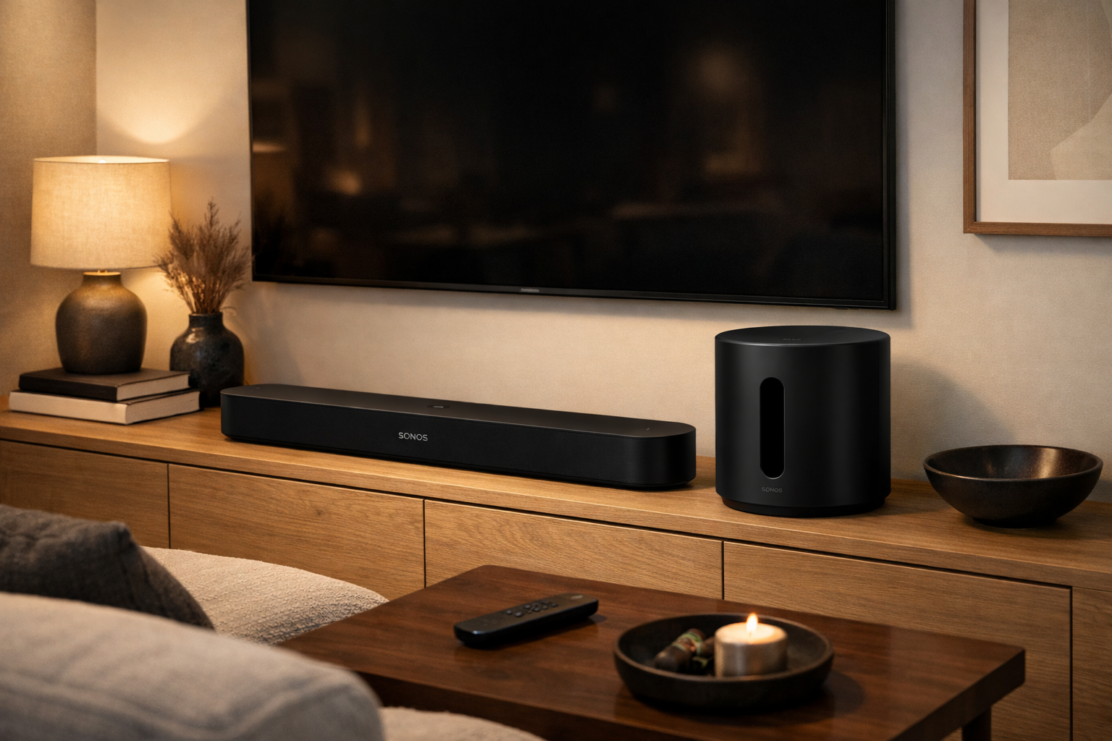
Sonos Beam Gen 2 vs Sonos Sub Mini
When building the perfect home theater system, one of the most common dilemmas Sonos enthusiasts face is deciding between investing in a premium soundbar or adding a dedicated subwoofer to their existing setup. The Sonos Beam (Gen 2) vs Sonos Sub Mini represent two fundamentally different approaches to improving your audio experience, yet at similar price points, the choice becomes surprisingly complex.
This comprehensive guide will help you understand whether you should prioritize the Beam Gen 2’s all-in-one smart soundbar capabilities or enhance your current Sonos system with the Sub Mini’s dedicated bass performance.
We’ll also explore how these products fit within the broader Sonos ecosystem and compare them against alternatives like the Sonos Arc, full-sized Sub Gen 3, and budget-friendly Ray.
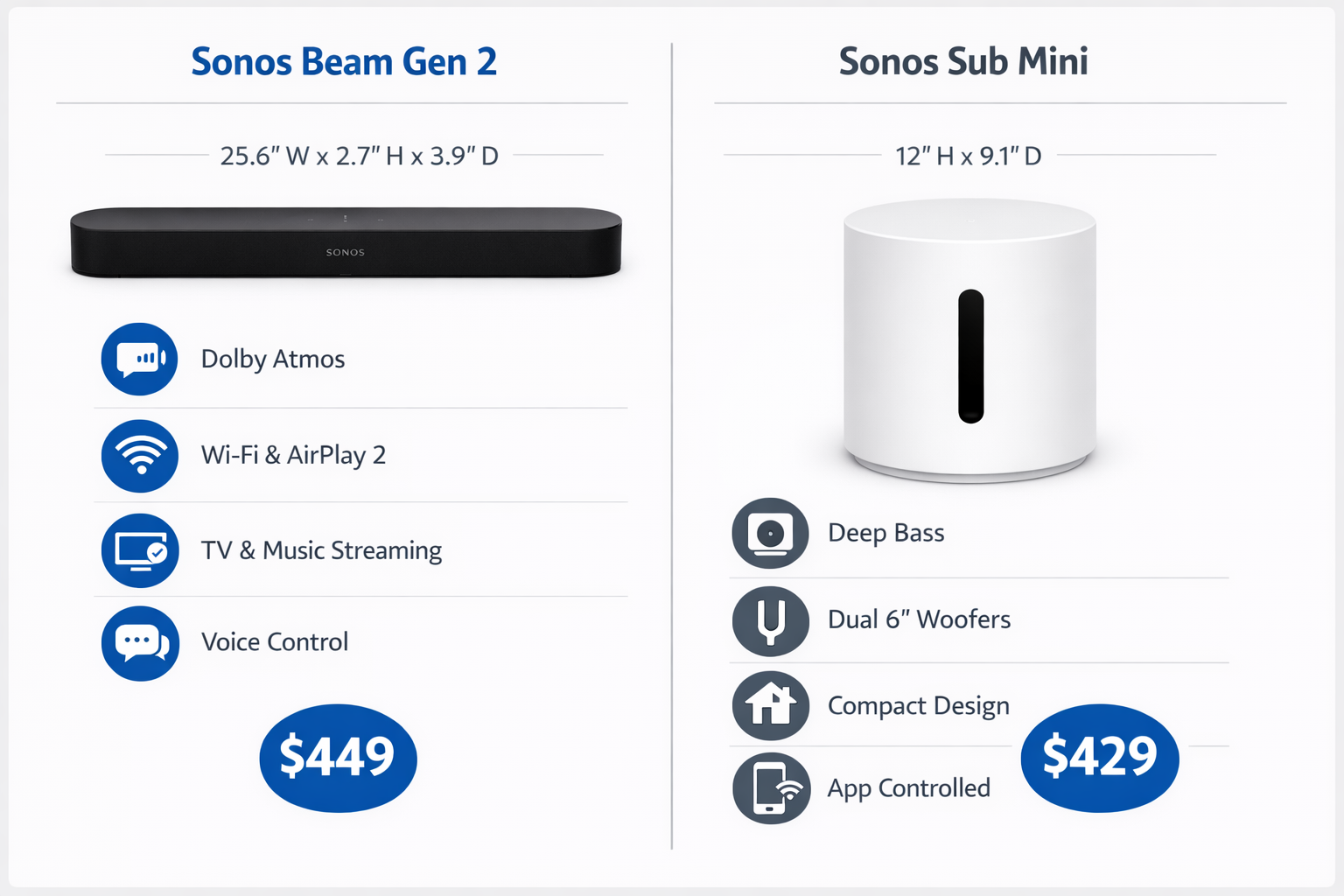
Quick Comparison Table
| Product | Price | Dolby Atmos | Bass Performance | Room Size | Best For |
|---|---|---|---|---|---|
| Sonos Beam Gen 2 | $399-$499 | Yes (Virtual) | Moderate | Small-Medium | Primary soundbar solution |
| Sonos Sub Mini | $399-$429 | N/A (Add-on) | Excellent (Low-end) | Small-Medium | Bass enhancement |
| Sonos Arc | $799-$899 | Yes (True 5.0.2) | Strong | Medium-Large | Premium home theater |
| Sonos Sub Gen 3 | $749-$799 | N/A (Add-on) | Exceptional | Medium-Large | Maximum bass impact |
| Sonos Ray | $199-$279 | No | Limited | Small | Budget entry point |
Understanding the Core Question: Soundbar or Subwoofer?
Before diving into individual product reviews, it’s crucial to understand that the Sonos Beam Gen 2 and Sub Mini serve entirely different purposes.
The Beam Gen 2 is a complete soundbar solution that processes audio from your TV and delivers a significantly improved listening experience compared to built-in TV speakers.
The Sub Mini, conversely, is an accessory component designed to work alongside an existing Sonos soundbar or speaker, specifically handling low-frequency sounds.
You need a soundbar first. If you don’t already own a Sonos soundbar (like the Ray, Beam, or Arc), the Sub Mini alone cannot connect to your television.
However, if you already own a Sonos soundbar and find yourself craving deeper bass for action movies or music, the Sub Mini becomes an attractive upgrade path.
Detailed Product Reviews
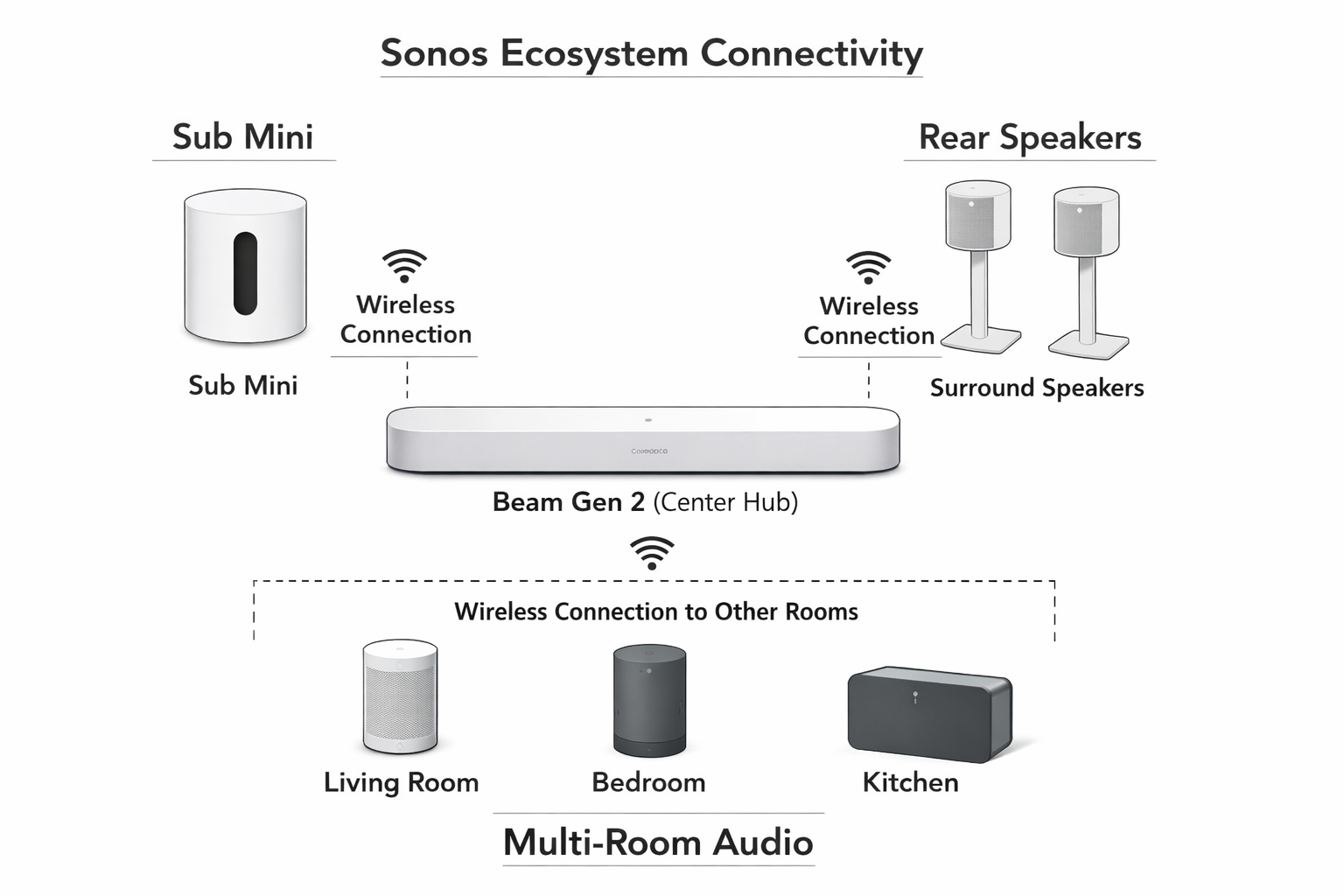
Sonos Beam (Gen 2): The Compact Powerhouse
The Beam Gen 2 represents Sonos’ sweet spot for most consumers—a soundbar that delivers impressive performance without the premium price tag or physical footprint of the flagship Arc. At $399-$499, it positions itself as a mid-range option that punches well above its weight class.
Key Features:
- Dolby Atmos support via virtualization technology
- HDMI eARC connectivity for high-quality audio passthrough
- Built-in Amazon Alexa and Google Assistant for voice control
- Five Class-D digital amplifiers powering four full-range woofers and one tweeter
- Compact dimensions: 25.6″ wide, making it ideal for TVs 50″ and larger
- Seamless Sonos ecosystem integration for multi-room audio
✅ Pros
Impressive soundstage for its size: Despite measuring just over two feet wide, the Beam Gen 2 creates a surprisingly wide and immersive sound field. The soundbar uses psychoacoustic processing to make audio appear to come from beyond the physical speaker boundaries.
Virtual Dolby Atmos capability: While it lacks the upward-firing drivers of the Arc, the Beam Gen 2 uses sophisticated audio processing to simulate height channels, creating a more three-dimensional sound experience than standard stereo soundbars.
HDMI eARC connectivity: This modern connection standard ensures you can pass through high-quality audio formats from your TV, including Dolby Atmos content from streaming services like Netflix, Disney+, and Apple TV+.
Smart home integration: With both Alexa and Google Assistant built-in, you can control playback, adjust volume, and manage smart home devices using only your voice. If you’re building an Alexa-enabled soundbar for your home, the Beam Gen 2 is an excellent choice.
Ecosystem expandability: Start with just the Beam Gen 2, then add rear speakers (Sonos One SL or Era 100) for true surround sound, or pair it with a Sub Mini or full-sized Sub for enhanced bass response.
❌ Cons
Limited bass without a subwoofer: The most significant limitation of the Beam Gen 2 is its bass response. While adequate for dialogue and mid-range frequencies, action movies and bass-heavy music reveal the soundbar’s physical limitations. The four woofers simply cannot move enough air to reproduce deep, rumbling low frequencies.
Virtual rather than true Dolby Atmos: Unlike the Arc with its angled upward-firing speakers, the Beam Gen 2 relies on audio processing tricks to simulate height. While effective, it doesn’t match the convincing overhead sound of soundbars with true Dolby Atmos capabilities.
No Bluetooth connectivity: Sonos has deliberately omitted Bluetooth from its ecosystem, relying instead on Wi-Fi streaming. While this provides better audio quality and multi-room capabilities, it means you can’t quickly connect a phone via Bluetooth for casual listening.
iOS-only Trueplay tuning: Sonos’ excellent room calibration technology, Trueplay, which uses your iPhone’s microphone to optimize sound for your specific room, remains unavailable to Android users—a frustrating limitation for half the smartphone market.
Best For: The Beam Gen 2 is ideal for apartment dwellers, condo owners, or anyone with a small to medium-sized living room (up to about 250 square feet) who wants a significant audio upgrade without overwhelming their space.
It’s particularly excellent for users who prioritize dialogue clarity—making it perfect for those seeking the best soundbar for dialogue—and who plan to potentially expand their system over time.
Sonos Sub Mini: Compact Bass Enhancement
The Sub Mini, introduced in 2022, filled a gap in Sonos’ lineup for customers who wanted enhanced bass but didn’t have the space or budget for the full-sized Sub Gen 3.
Priced at $399-$429, it costs roughly the same as the Beam Gen 2, making the decision between them particularly interesting.
Key Features:
- Dual force-cancelling woofers (two 6-inch drivers facing each other)
- Cylindrical design measuring 9.1″ wide and 11.6″ tall
- Wireless connectivity to compatible Sonos products
- Frequency response down to approximately 25Hz
- Available in matte black or white finishes
- Can be positioned vertically or laid horizontally
✅ Pros
Remarkable bass for its size: The Sub Mini’s dual 6-inch woofers deliver surprisingly deep and punchy bass that transforms the listening experience of paired soundbars. Movies gain visceral impact during explosions and crashes, while music genres like hip-hop, EDM, and rock benefit from fuller low-end presence.
Force-cancelling technology: The two woofers face each other and move in opposite directions, which cancels out vibrations that would otherwise rattle the cabinet or surrounding furniture. This engineering allows the Sub Mini to produce clean bass without the distortion or buzzing common in lesser subwoofers.
Seamless wireless integration: Setup takes minutes—simply plug in the Sub Mini, open the Sonos app, and add it to your existing soundbar. The system automatically routes low frequencies to the subwoofer and re-calibrates the soundbar to focus on mid and high frequencies, creating a more balanced overall sound.
Compact and discreet: At roughly the size of a small wastebasket, the Sub Mini can tuck into corners, slide under furniture, or sit on a shelf without dominating your room’s aesthetic. This makes it far more apartment-friendly than traditional subwoofers.
Flexible placement: Understanding best subwoofer placement with soundbar setups is crucial, and the Sub Mini’s compact size gives you more options than larger alternatives. While corner placement typically maximizes bass output, the Sub Mini performs well in various positions.
❌ Cons
High price for an accessory: At $399-$429, the Sub Mini costs as much as the Beam Gen 2 soundbar itself. This means a complete Beam Gen 2 + Sub Mini setup runs $800-$900, approaching the cost of the flagship Arc soundbar alone.
Limited output in larger rooms: While impressive for its size, the Sub Mini’s 6-inch drivers and compact cabinet simply cannot move enough air to adequately fill rooms larger than about 250-300 square feet. In spacious living rooms or open-concept layouts, you’ll want the full-sized Sub Gen 3.
Cannot pair two Sub Minis: Unlike the full-sized Sub Gen 3, where you can pair two units for even more dramatic bass, Sonos limits systems to a single Sub Mini. If you want dual subwoofer performance, you’ll need to invest in two Sub Gen 3 units.
No physical inputs: The Sub Mini connects exclusively via Wi-Fi to other Sonos products. You cannot use it as a standalone subwoofer with non-Sonos equipment, limiting its versatility compared to traditional powered subwoofers with line-level inputs.
Best For: The Sub Mini is perfect for Sonos Beam Gen 2, Ray, or even Sonos One/Era 100 owners in apartments, condos, or smaller homes who want to add substantial bass without the space requirements or expense of the full-sized Sub Gen 3. It’s also ideal for those who value aesthetic integration and want a subwoofer that doesn’t dominate the room visually.
Sonos Arc: The Premium Alternative
For context in this comparison, the Sonos Arc represents what you could purchase if you combined the budgets for both a Beam Gen 2 and Sub Mini. At $799-$899, it’s Sonos’ flagship soundbar and delivers a markedly different experience.
Key Features:
- True Dolby Atmos with upward-firing drivers (5.0.2 channel configuration)
- Eleven Class-D digital amplifiers powering eleven speakers
- Eight elliptical woofers for significantly stronger bass than Beam Gen 2
- Three silk-dome tweeters, including two angled upward for height effects
- 45″ wide, designed for TVs 55″ and larger
- Speech Enhancement and Night Sound modes
✅ Pros
The Arc delivers genuinely immersive Dolby Atmos sound with its upward-angled drivers creating convincing overhead effects. Its eight woofers produce substantially more bass than the Beam Gen 2, though still not matching a dedicated subwoofer. The larger cabinet and additional drivers create a more powerful, room-filling sound suitable for spaces up to 400 square feet. For those researching the best soundbar 2025 options, the Arc consistently ranks among the top contenders.
❌ Cons
The Arc’s $799-$899 price tag is steep, and many users still add a Sub ($749-$799) for truly deep bass, bringing the total system cost to $1,500-$1,700. Its 45-inch width won’t fit with smaller TVs, and it offers only one HDMI input with no pass-through capability. Like all Sonos products, Bluetooth remains absent.
Best For: Home theater enthusiasts with larger living rooms (300-400+ square feet), TVs 55″ or larger, and budgets that can accommodate a premium soundbar. It’s especially compelling for those who want the best possible soundbar-only experience before adding a subwoofer.
Sonos Sub (Gen 3): Maximum Bass Impact
The full-sized Sub Gen 3, priced at $749-$799, represents Sonos’ ultimate bass solution. Its dramatically larger cabinet and dual force-cancelling drivers deliver substantially more output than the Sub Mini.
Key Features:
- Dual force-cancelling 6-inch woofers in a much larger cabinet
- Frequency response down to approximately 25Hz with higher SPL capability
- Distinctive sculptural design with central opening
- Can be positioned vertically or laid flat
- Ability to pair two Subs in a single system
- Available in matte black or white
✅ Pros
The Sub Gen 3 delivers truly cinematic bass that can shake your room during action sequences. Its larger cabinet volume allows the drivers to move more air, creating deeper, more authoritative low frequencies. The versatile placement options (vertical or horizontal) and ability to pair two units make it suitable for even demanding home theater installations.
❌ Cons
At $749-$799, the Sub Gen 3 costs nearly twice as much as the Sub Mini. Its substantial size (15.3″ x 15.8″ x 6.2″) makes it challenging to conceal and requires significant floor space. In smaller rooms, you’ll likely need to reduce its output to avoid overwhelming the space, making it overkill for apartments or compact living rooms.
Best For: Users with dedicated home theater rooms or large living spaces (400+ square feet) who want the most impactful bass possible within the Sonos ecosystem. It pairs beautifully with the Arc for a premium home theater experience or with the Beam Gen 2 in larger rooms.
Sonos Ray: The Budget Entry Point
The Sonos Ray, at just $199-$279, offers an affordable entry into the Sonos ecosystem, though with significant compromises compared to the Beam Gen 2.
Key Features:
- Compact design (22.4″ wide) for smaller TVs
- Optical audio input only (no HDMI)
- Four Class-D amplifiers powering four full-range drivers
- Apple AirPlay 2 and Wi-Fi streaming support
- Stereo-only (no Dolby Atmos or surround sound processing)
✅ Pros
The Ray excels at dialogue clarity and music playback, offering a substantial upgrade over built-in TV speakers at an accessible price point. Its compact size fits perfectly with smaller TVs in bedrooms or kitchens. It provides an affordable entry into the Sonos ecosystem with the option to expand later with a Sub Mini or rear speakers.
❌ Cons
The optical-only connection limits audio quality compared to HDMI eARC, and there’s no Dolby Atmos support whatsoever. Bass response is noticeably limited, even compared to the Beam Gen 2. The Ray also lacks built-in voice assistants, requiring a separate Sonos speaker for voice control.
Best For: Budget-conscious buyers with smaller TVs (under 50″), secondary viewing spaces like bedrooms, or those who primarily watch dialogue-heavy content and don’t need immersive surround sound. It’s an excellent choice for those exploring best budget soundbar with subwoofer options when paired with the Sub Mini.
The Core Decision: Beam Gen 2 vs Sub Mini
Now that we’ve reviewed each product, let’s address the central question: should you buy the Sonos Beam Gen 2 or the Sonos Sub Mini?
The answer depends entirely on your current situation:
Scenario 1: You Don’t Own a Sonos Soundbar
Decision: Buy the Beam Gen 2
This is straightforward—you cannot use the Sub Mini without a compatible Sonos soundbar or speaker. The Beam Gen 2 provides a complete audio solution that dramatically improves your TV sound. You can always add a Sub Mini later if you crave more bass.
Recommended Path:
- Purchase Beam Gen 2 now ($399-$499)
- Use it for several months to understand your bass preferences
- Add Sub Mini later if needed ($399-$429)
- Consider rear speakers (Sonos One SL or Era 100) for true surround sound
This incremental approach spreads the cost over time and ensures you’re making informed decisions based on actual listening experience rather than assumptions.
Scenario 2: You Own a Sonos Ray
Decision: Probably the Sub Mini
If you already own the Ray and are satisfied with its dialogue clarity and overall performance, adding the Sub Mini transforms it into a much more capable system. The Ray + Sub Mini combination ($598-$708 total) delivers impressive performance for small to medium rooms at a lower cost than the Beam Gen 2 + Sub Mini.
However, if you find the Ray’s lack of Dolby Atmos and HDMI connectivity limiting, consider selling it and upgrading to the Beam Gen 2 instead. The Beam Gen 2 alone may provide more satisfaction than the Ray + Sub Mini for certain content types.
Scenario 3: You Own a Sonos Beam Gen 2
Decision: Evaluate your bass needs
If you already own the Beam Gen 2 and find yourself turning up the volume during action scenes or feeling disappointed by the low-end response during music playback, the Sub Mini is a logical next step. It addresses the Beam Gen 2’s primary weakness while maintaining the compact aesthetic.
However, consider these alternatives:
- Wait and save for the Sub Gen 3 if you have a larger room or plan to upgrade to a bigger space
- Add rear speakers first if you prioritize surround sound immersion over bass depth
- Try Trueplay tuning (iOS only) to optimize your current setup before spending more
Scenario 4: You’re Building a System from Scratch
Decision: Start with Beam Gen 2, add Sub Mini later
For most users building their first Sonos home theater system, the Beam Gen 2 should be your foundation. It provides the most immediate improvement to your TV viewing experience and gives you time to assess whether you need additional bass.
Budget-Conscious Path (Total: ~$400-$500):
- Beam Gen 2 only
- Excellent for apartments and smaller spaces
- Add Sub Mini when budget allows
Balanced Path (Total: ~$800-$900):
- Beam Gen 2 + Sub Mini
- Ideal for most small to medium living rooms
- Provides complete sound with strong bass
Premium Path (Total: ~$1,500+):
- Beam Gen 2 + Sub Mini + two Sonos One SL for rear channels
- Full 5.1 surround sound system
- Suitable for dedicated home theater spaces
Alternative Premium Path (Total: ~$800-$900):
- Sonos Arc only (no subwoofer initially)
- Better soundbar with stronger built-in bass
- Add Sub Gen 3 later for ultimate performance
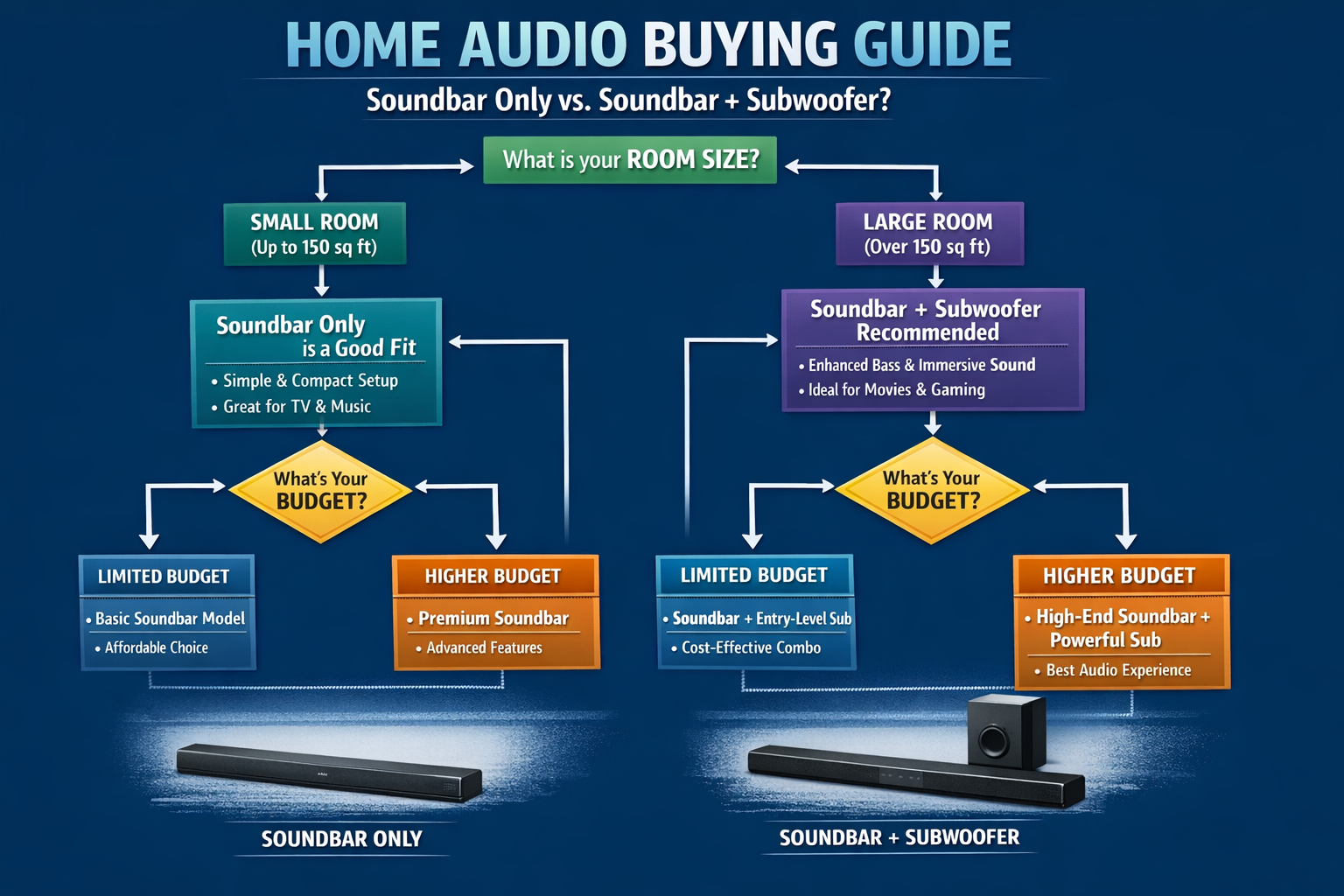
Comprehensive Buying Guide
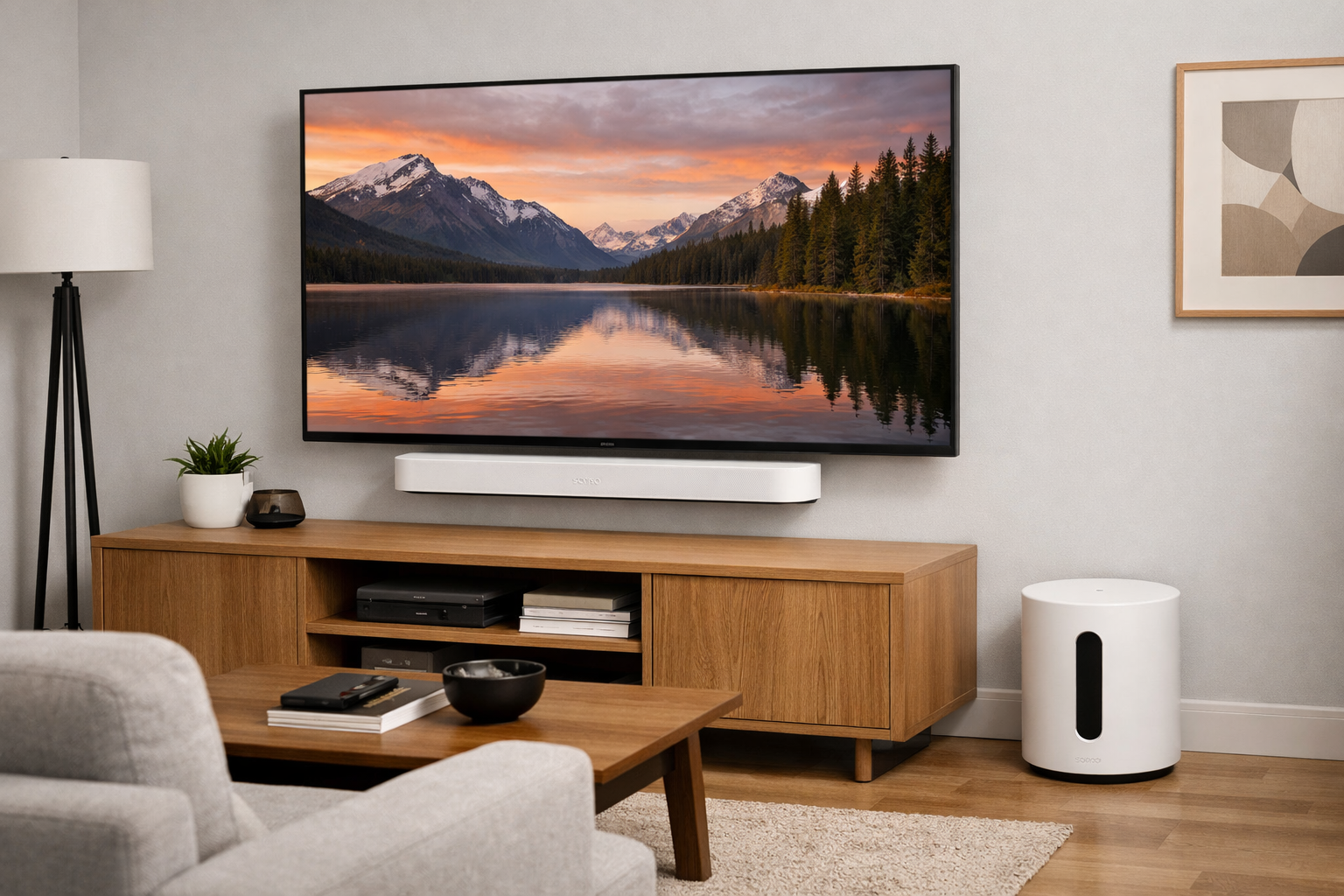
Room Size Considerations
Small Rooms (100-200 sq ft):
- Beam Gen 2 alone is often sufficient
- Sub Mini may overpower the space unless carefully calibrated
- Ray + Sub Mini is an excellent budget combination
Medium Rooms (200-300 sq ft):
- Beam Gen 2 + Sub Mini is the sweet spot
- Arc alone provides excellent performance
- Ray + Sub Mini works but may lack overall power
Large Rooms (300-400+ sq ft):
- Arc + Sub Gen 3 is the recommended combination
- Beam Gen 2 + Sub Gen 3 works but Arc is preferable
- Sub Mini may lack sufficient output
Content Preferences
Dialogue-Heavy Content (News, Talk Shows, Dramas):
- Beam Gen 2 or Ray alone is sufficient
- Subwoofer adds little value for these content types
- Prioritize Speech Enhancement features
Action Movies and Gaming:
- Subwoofer (Sub Mini or Sub Gen 3) is highly recommended
- Dolby Atmos support (Beam Gen 2 or Arc) enhances immersion
- Consider the Beam Gen 2 + Sub Mini combination
Music Listening:
- Subwoofer significantly improves music enjoyment
- Beam Gen 2 or Arc provide excellent stereo imaging
- For dedicated music listening, consider Sonos Five speakers instead
Budget Planning
Under $500:
- Beam Gen 2 alone ($399-$499)
- Ray + save for Sub Mini later ($199-$279)
$500-$1,000:
- Beam Gen 2 + Sub Mini ($798-$928)
- Arc alone ($799-$899)
$1,000-$1,500:
- Arc + Sub Mini ($1,198-$1,328)
- Beam Gen 2 + Sub Gen 3 ($1,148-$1,298)
$1,500+:
- Arc + Sub Gen 3 ($1,548-$1,698)
- Arc + Sub Gen 3 + rear speakers ($1,900+)
Ecosystem Considerations
One of Sonos’ greatest strengths is its ecosystem flexibility. Every product works seamlessly with every other product, allowing you to:
- Start small and expand: Begin with a Ray or Beam Gen 2, add a subwoofer later, then rear speakers
- Multi-room audio: Use the same Sonos app to control soundbars, speakers, and subwoofers throughout your home
- Wireless convenience: No need to run speaker wire; everything connects via Wi-Fi
- Unified control: One app controls your entire system, with voice control via Alexa or Google Assistant
This ecosystem approach means your initial purchase isn’t isolated—it’s the foundation of a potentially comprehensive whole-home audio system.
Technical Connectivity
HDMI eARC vs Optical:
- Beam Gen 2 and Arc support HDMI eARC for high-quality audio (including Dolby Atmos)
- Ray uses optical audio only, limiting audio quality and format support
- If your TV has HDMI eARC, choose Beam Gen 2 or Arc over Ray
Wi-Fi Requirements:
- All Sonos products require a stable Wi-Fi network
- 2.4GHz and 5GHz networks supported
- Ethernet connection available on soundbars for more stable connection
- No Bluetooth support across the entire Sonos lineup
Physical Placement
Soundbar Placement:
- Mount on wall below TV or place on TV stand
- Beam Gen 2: Best for TVs 50″ and larger
- Arc: Best for TVs 55″ and larger
- Ray: Best for TVs under 50″
Subwoofer Placement:
- Sub Mini: Flexible placement due to compact size; corners often maximize output
- Sub Gen 3: Requires more floor space; can be positioned vertically or horizontally
- Experiment with placement using the Sonos app’s Sub Audio feature
- Avoid placing directly against walls (leave a few inches for airflow)
Frequently Asked Questions
Can I use the Sonos Sub Mini without a soundbar?
No, the Sub Mini requires a compatible Sonos product to function. It cannot connect directly to your TV or operate as a standalone subwoofer. Compatible products include the Beam Gen 2, Sonos Arc, Ray soundbars, as well as Sonos One, Era 100, Era 300, and Five speakers. The Sub Mini connects wirelessly through the Sonos app and receives audio signals from the paired device.
Is the Beam Gen 2 + Sub Mini better than the Arc alone?
This depends on your priorities and room size. The Arc alone delivers more convincing Dolby Atmos with its upward-firing speakers and produces stronger mid-bass from its eight woofers.
However, the Beam Gen 2 + Sub Mini combination provides deeper bass extension and more visceral low-frequency impact.
For rooms under 300 square feet, the Beam Gen 2 + Sub Mini often provides better overall value and performance.
For larger rooms or if Dolby Atmos immersion is your priority, the Arc alone (with plans to add a subwoofer later) may be preferable.
Can I upgrade from Sub Mini to Sub Gen 3 later?
Yes, you can easily swap the Sub Mini for a Sub Gen 3 through the Sonos app. Simply remove the Sub Mini from your system and add the Sub Gen 3.
However, Sonos products retain their value well on the secondhand market, so you can typically sell your Sub Mini to offset some of the Sub Gen 3’s cost.
Keep in mind that the Sub Gen 3 is substantially larger and may not fit in the same placement location as your Sub Mini.
Does the Beam Gen 2 work with non-Sonos subwoofers?
No, the Beam Gen 2 only works with Sonos subwoofers (Sub Mini or Sub Gen 3). There’s no physical output to connect a third-party subwoofer.
This is a deliberate design choice by Sonos to ensure seamless wireless integration and optimal performance.
If you want to use the Beam Gen 2, you’ll need to stay within the Sonos ecosystem for bass enhancement.
How much does the Sub Mini improve music listening?
The improvement is substantial, particularly for bass-heavy music genres. The Sub Mini handles frequencies below 80Hz, allowing the Beam Gen 2 or Ray to focus on midrange and treble frequencies.
This creates a more balanced, fuller sound with better instrument separation. Music genres like hip-hop, EDM, rock, and orchestral recordings benefit most dramatically.
For those interested in best soundbar for music performance, the combination of Beam Gen 2 and Sub Mini delivers impressive results that rival much more expensive dedicated music systems.
Is Trueplay tuning really necessary?
While not absolutely necessary, Trueplay tuning significantly improves performance by optimizing the soundbar and subwoofer for your specific room’s acoustics. It compensates for room reflections, furniture absorption, and speaker placement issues.
Unfortunately, it’s only available for iOS devices, which frustrates Android users. If you have access to an iPhone or iPad, even borrowed from a friend, running Trueplay once (it takes about two minutes) is highly recommended.
The improvement in sound clarity and bass balance is immediately noticeable.
Final Verdict and Recommendations
After examining all options, here are our clear recommendations for different user scenarios:
Best Overall Value: Sonos Beam Gen 2
For most consumers, the Beam Gen 2 represents the best starting point. It delivers excellent sound quality for its size, includes modern features like Dolby Atmos and HDMI eARC, and provides a complete audio solution out of the box. While its bass response is limited, it’s sufficient for casual viewing and can always be enhanced later with a Sub Mini or Sub Gen 3.
Recommended for: First-time soundbar buyers, apartment dwellers, users with small to medium rooms, and anyone wanting a complete solution at a reasonable price.
Best Bass Enhancement: Sonos Sub Mini
If you already own a Sonos soundbar and want to dramatically improve bass performance without the expense or space requirements of the Sub Gen 3, the Sub Mini is exceptional. It transforms the Ray or Beam Gen 2 into a much more capable system, adding depth and impact that makes movies and music significantly more enjoyable.
Recommended for: Existing Sonos soundbar owners in small to medium rooms who prioritize bass performance and want a compact solution.
Best Premium Experience: Sonos Arc + Sub Gen 3
For those with larger rooms and bigger budgets, the Arc + Sub Gen 3 combination delivers the most impressive home theater experience within the Sonos ecosystem.
The Arc’s true Dolby Atmos creates convincing overhead effects, while the Sub Gen 3 provides room-shaking bass. This combination rivals dedicated home theater receivers with separate speakers.
Recommended for: Home theater enthusiasts, larger living rooms (300+ square feet), and users who want the best possible performance regardless of price.
Best Budget Option: Sonos Ray + Sub Mini (Later)
Starting with the Ray and adding a Sub Mini when budget allows creates a capable system for under $700. While it lacks Dolby Atmos and HDMI connectivity, it delivers excellent dialogue clarity and, with the Sub Mini added, surprisingly full sound for smaller spaces.
Recommended for: Budget-conscious buyers, secondary rooms (bedrooms, kitchens), and users with smaller TVs who don’t need advanced features.
Best Balanced Setup: Beam Gen 2 + Sub Mini
This combination hits the sweet spot for most users with small to medium living rooms.
The Beam Gen 2 provides excellent midrange and treble performance with virtual Dolby Atmos, while the Sub Mini handles deep bass.
Together, they create a balanced, room-filling sound that handles movies, TV, and music with equal competence.
Recommended for: Most users seeking a complete home theater solution for rooms under 300 square feet, those who value both dialogue clarity and bass impact, and anyone wanting the best performance-to-size ratio.
Making Your Decision
Ultimately, choosing between the Sonos Beam Gen 2 and Sub Mini, or deciding how they fit into your broader Sonos system, comes down to your current setup, room size, content preferences, and budget.
Choose the Beam Gen 2 if:
- You don’t currently own a Sonos soundbar
- You want a complete, standalone solution
- Your priority is improving dialogue clarity and overall TV audio
- You have a small to medium room
- You want Dolby Atmos support
- You plan to potentially expand your system later
Choose the Sub Mini if:
- You already own a Sonos Ray, Beam Gen 2, or compatible speaker
- Bass performance is your primary concern
- You have a small to medium room where the Sub Gen 3 would be overkill
- You want to maintain a compact, minimalist aesthetic
- You primarily watch action movies or listen to bass-heavy music
Consider the Arc instead if:
- You have a larger room (300+ square feet)
- You want the most convincing Dolby Atmos experience
- Your TV is 55″ or larger
- You can budget $799-$899 for a soundbar alone
- You prioritize the best possible soundbar performance before adding a subwoofer
Consider the Sub Gen 3 instead if:
- You have a large room that needs more bass output than the Sub Mini provides
- You want the option to pair two subwoofers in the future
- You don’t mind the larger footprint
- You’re pairing with the Arc or using in a dedicated home theater space
The beauty of the Sonos ecosystem is that there’s no wrong choice, every product works seamlessly together, and you can always expand or upgrade your system over time.
Start with what fits your current needs and budget, knowing that your investment will integrate perfectly with future additions.
Whether you choose the versatile Beam Gen 2, the bass-enhancing Sub Mini, or plan a more comprehensive system with the Arc and Sub Gen 3, you’re investing in a premium audio ecosystem that will transform your home entertainment experience for years to come.