HDMI ARC
Pros:
- High-quality audio
- Single cable for audio and control
- Supports advanced formats like Dolby Atmos
Cons:
- May require specific TV and soundbar models
- Can be tricky to set up for beginners

Connecting a soundbar to your Samsung TV can dramatically improve your audio experience, creating a more immersive atmosphere for your favorite shows and movies.
Whether you’re a cinephile or a casual viewer, the right sound setup is essential for enjoying high-quality sound.
Here’s what you’ll learn about enhancing your sound experience.
This visual summarizes the pros and cons of four main soundbar connection types, helping you choose the best option for your Samsung TV setup.
When it comes to enhancing your home entertainment, the importance of sound quality cannot be overstated.
Built-in TV speakers often fall short in delivering the audio experience we crave, especially with today’s advanced video technology.
That’s where a soundbar comes into play. By connecting a soundbar to your Samsung TV, you can significantly elevate your viewing experience, immersing yourself in rich, cinematic sound!
Soundbars are designed to provide superior audio performance that fills the room, creating a more engaging atmosphere whether you’re watching movies, playing video games, or listening to music.
With their sleek designs and advanced technologies, soundbars not only look great but also deliver crisp dialogues and booming bass that built-in speakers simply can’t match.

By opting for a soundbar, you’re investing in a more immersive experience that transforms your TV into a full-fledged entertainment system. You’ll be able to enjoy your favorite content like never before, with audio depth that makes every moment feel impactful!
One of the best ways to connect your soundbar to a Samsung TV is through HDMI ARC (Audio Return Channel). This method not only provides top-notch audio quality but also allows for seamless control between your devices. Here’s how you can set it up:
Once connected, you’ll enjoy an effortless experience where a single remote can control both your soundbar and TV, making life a little easier!
Finding the HDMI ARC port is crucial for your setup. Typically, it’s labeled as “ARC” on your TV. For detailed guidance specific to your model, you can refer to the Samsung support page. You can check the back or side of your Samsung TV for the following:
Once you’ve identified the port, connecting your soundbar becomes a breeze!
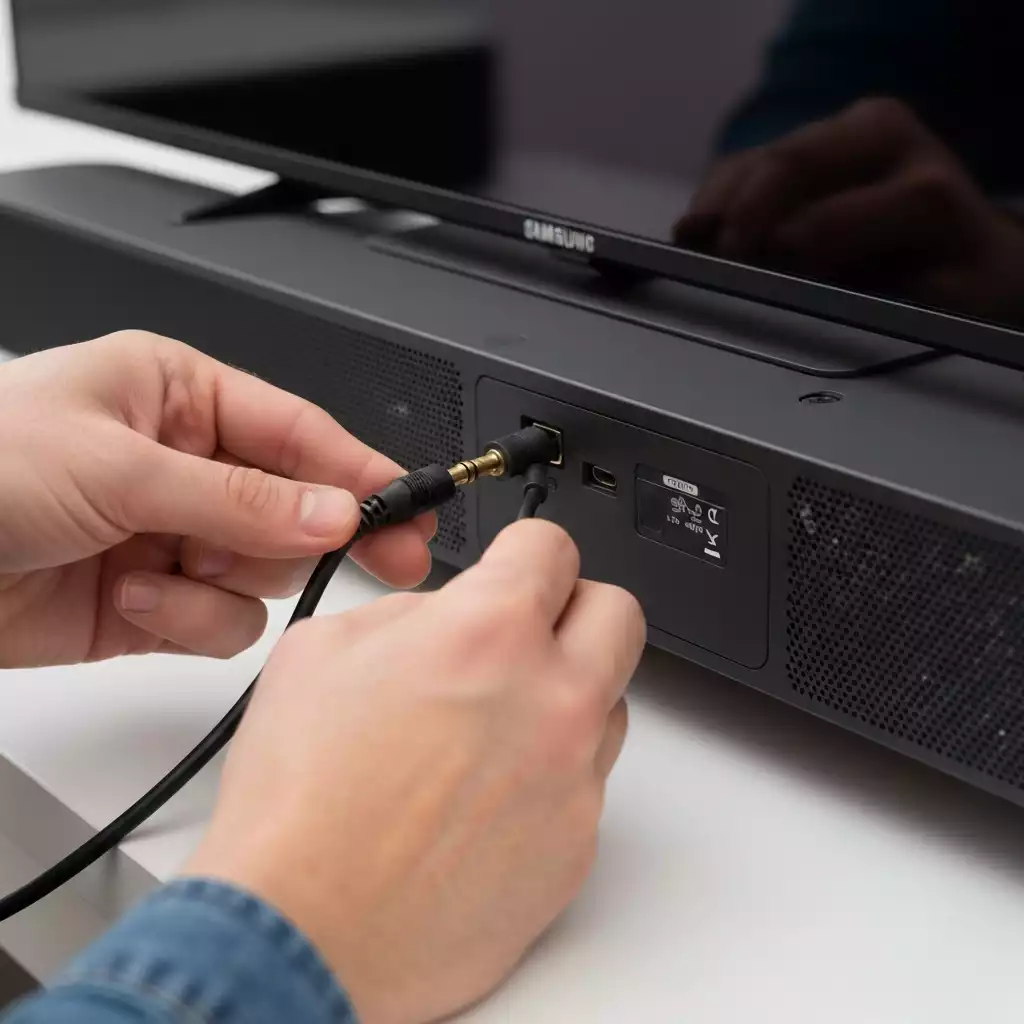
If HDMI ARC isn’t an option for your setup, using an optical cable is another reliable way to connect your soundbar to your Samsung TV.
This method offers a high-quality audio output, making it a favorite for many enthusiasts. For more specific instructions on setting up optical connections, the Samsung Canada support page provides helpful steps.
This connection method is especially useful if you encounter compatibility issues with HDMI ARC. Just set it up correctly, and you’re good to go!
To ensure proper audio transmission, adjusting the sound output settings on your Samsung TV is necessary:
By doing this, you’ll ensure that your soundbar receives the best possible audio signal, resulting in a richer listening experience!
For those who prefer a wireless connection, pairing your soundbar with your Samsung TV via Bluetooth is a convenient option. This method allows for a clean setup without the hassle of cables!
Once paired, you’ll enjoy the freedom of moving your devices around without being tethered by wires!
If you run into issues while connecting via Bluetooth, consider these troubleshooting tips:
Following these steps can help you resolve most common pairing issues, ensuring a seamless listening experience!
For those with smart soundbars, Wi-Fi connections provide an easy way to integrate your audio setup. Wi-Fi connections often allow for more advanced features and functionalities, such as streaming music directly from the internet. This can be a game-changer for music lovers!
By leveraging Wi-Fi, you not only gain more flexibility but also access to a host of smart features that enhance your audio experience.
The SmartThings app is an essential tool for Samsung users. To learn more about its capabilities and how it can enhance your soundbar experience, you can visit the Samsung Singapore support page. You can use it to:
Utilizing the SmartThings app adds another layer of convenience, making your audio experience even more enjoyable!
Here’s a brief recap of the key points discussed so far:
A1: Soundbars significantly enhance audio quality by providing improved clarity for dialogues, richer bass response for movies and music, and a more immersive listening experience compared to the often limited performance of built-in TV speakers.
A2: Connecting via HDMI ARC (Audio Return Channel) is generally considered the best method. It offers top-notch audio quality, supports advanced formats like Dolby Atmos, and allows for seamless control of both your TV and soundbar with a single remote.
A3: Yes, if HDMI ARC is not available, you can use an optical cable. This method provides good sound quality and is compatible with most devices. Other alternatives include Bluetooth for wireless convenience, and Wi-Fi for smart soundbars offering advanced features and multi-room setups.
A4: To ensure a successful Bluetooth connection, put your soundbar in pairing mode, navigate to the Sound Output settings on your TV to select Bluetooth, ensure both devices are within range, check for software updates, and if issues persist, restart both devices and try again.
A5: Yes, especially with smart soundbars connected via Wi-Fi. Samsung’s SmartThings app allows you to control the soundbar, adjust settings, group it with other smart devices for synchronized audio, and customize sound profiles from your smartphone.
Next Steps for a Seamless Sound Experience
When it comes to connecting your soundbar to your Samsung TV, it’s essential to consider the benefits and drawbacks of each connection method.
Let’s break down the four main types of connections: HDMI ARC, optical, Bluetooth, and Wi-Fi. Below is a comparison table that highlights the key points of each method.
| Connection Type | Pros | Cons |
|---|---|---|
| HDMI ARC |
|
|
| Optical |
|
|
| Bluetooth |
|
|
| Wi-Fi |
|
|
By weighing these options, you can determine which connection method suits your needs best, enhancing your overall viewing experience!
To ensure a smooth setup for your soundbar, I highly recommend checking out various resources that provide helpful information. Here are some great options to consider:
Taking advantage of these resources can make your setup experience much more enjoyable and hassle-free!
After connecting your soundbar, it’s crucial to optimize the sound settings on your Samsung TV and soundbar for the best audio performance. Here are some tips to help you achieve that:
These adjustments can significantly enhance your listening experience, making it more immersive and enjoyable!
Here is a quick recap of the important points discussed in the article:

Pingback: Best Budget Soundbar With Subwoofer: 7 Affordable Combos That Actually Sound Big - Best Sound Bar to Buy