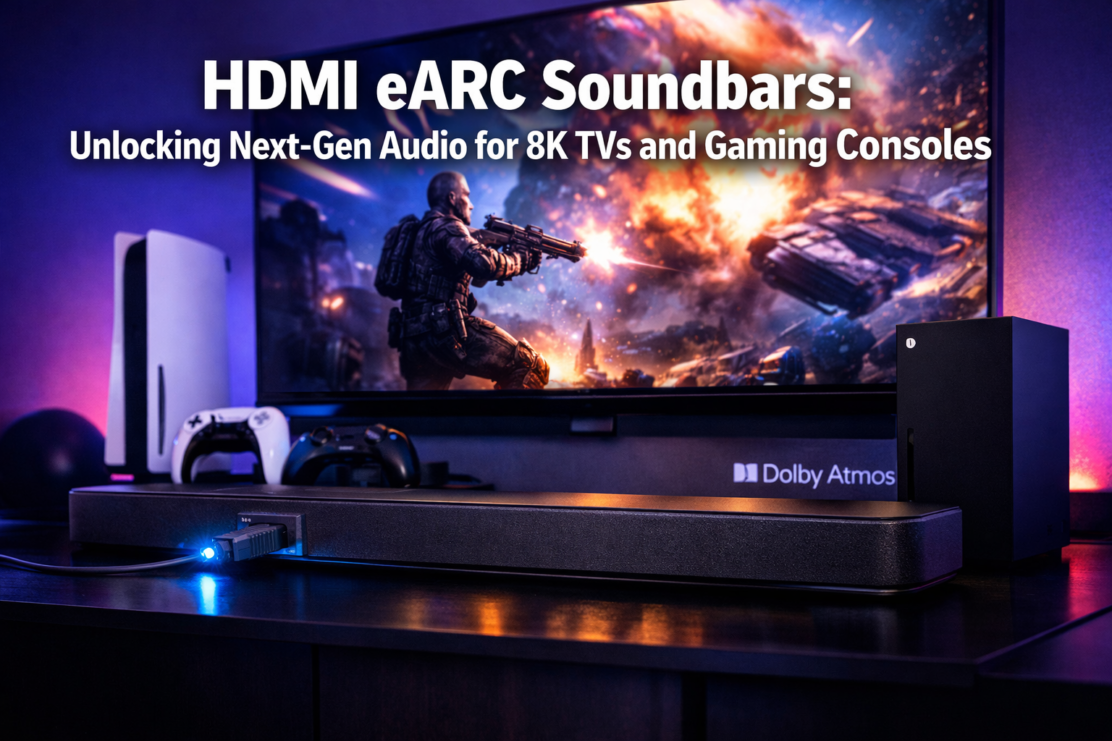
HDMI eARC Soundbars
Picture this: you’ve just unboxed your stunning new 8K TV or the latest gaming console, eager to experience cutting-edge visuals. But something’s missing.
The built-in TV speakers deliver flat, lifeless audio that fails to match the breathtaking graphics on screen.
This is where HDMI eARC Soundbars: Unlocking Next-Gen Audio for 8K TVs and Gaming Consoles becomes essential for 2026 home entertainment setups.
The evolution from standard HDMI ARC (Audio Return Channel) to eARC (enhanced Audio Return Channel) represents a revolutionary leap in home audio technology.
While traditional ARC connections struggle with compressed audio formats, eARC delivers the bandwidth necessary for lossless, high-resolution audio that modern content demands.
For gamers preparing for PlayStation 6 and next-generation Xbox upgrades, this technology ensures every explosion, footstep, and musical score reaches your ears exactly as developers intended.
Key Takeaways
- 🎧 eARC provides up to 37 Mbps bandwidth compared to ARC’s 1 Mbps, enabling uncompressed Dolby Atmos and DTS:X audio formats for cinema-quality sound
- 🎮 Gaming consoles benefit from reduced latency through eARC connections, with HDMI 2.1 passthrough supporting 4K 120Hz gameplay without audio delay
- 📺 2026 flagship soundbars feature advanced room calibration technologies like Dirac Live and SpaceFit Sound Pro for optimized audio tailored to your space
- 🔌 Limited passthrough ports on compact models mean careful planning is needed when connecting multiple devices to eARC-enabled soundbars
- 💰 Premium eARC soundbars range from mid-tier to flagship pricing, with 11.1.4 channel configurations offering the most immersive spatial audio experiences
Understanding eARC Technology and Why It Matters for Modern Audio
The Technical Difference Between ARC and eARC
Traditional HDMI ARC connections revolutionized home theater setups by allowing audio to travel from your TV back to your soundbar through a single cable.
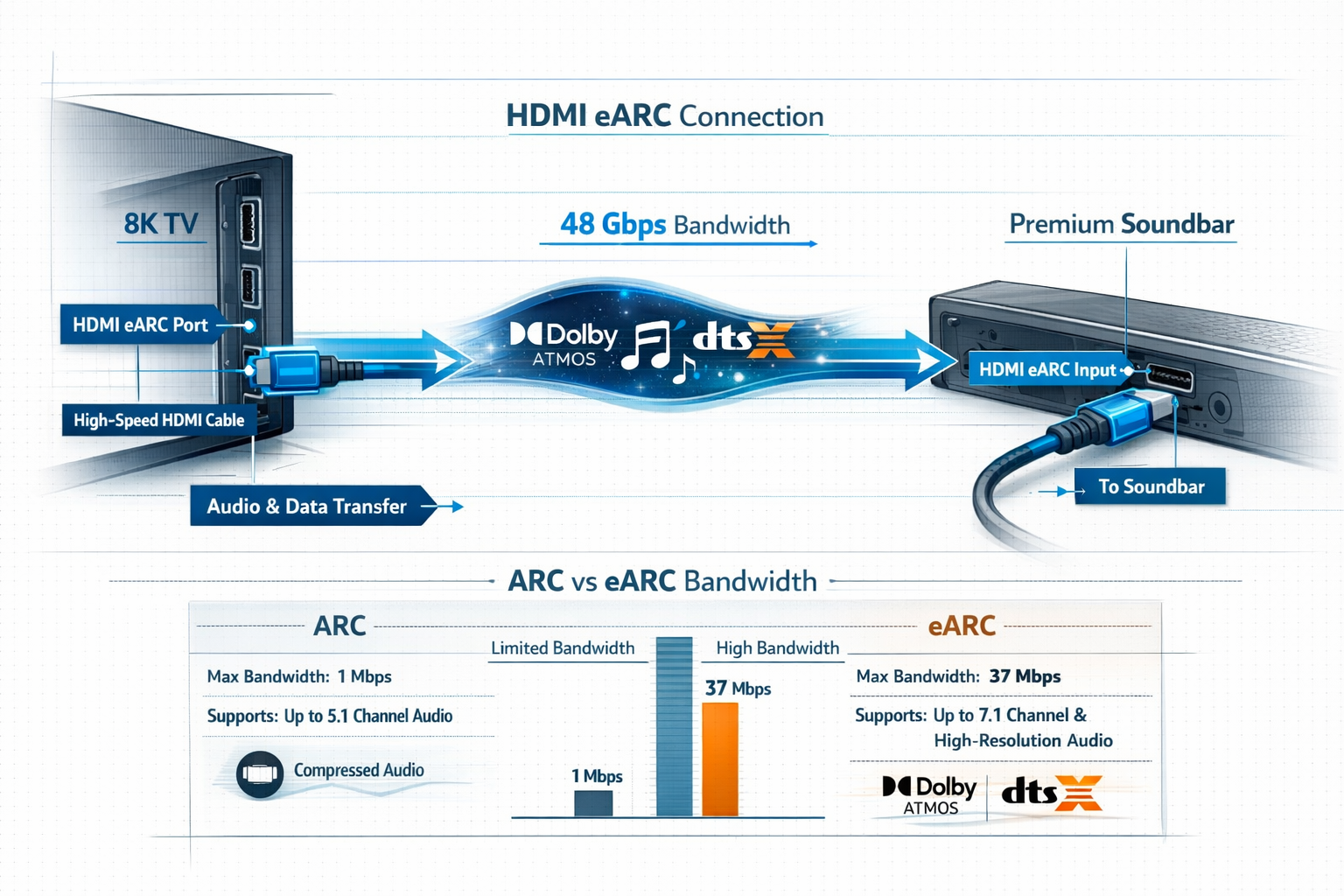
However, ARC’s 1 Mbps bandwidth limitation restricts it to compressed audio formats like standard Dolby Digital 5.1. This compression strips away the nuanced details that make modern soundtracks truly immersive.
Enhanced Audio Return Channel (eARC) shatters these limitations with bandwidth up to 37 Mbps[6].
This massive increase allows uncompressed, lossless audio formats to flow freely between your TV and soundbar.
The result? You experience Dolby Atmos, Dolby TrueHD, DTS:X, and high-resolution LPCM audio exactly as sound engineers mixed them in professional studios.
For those connecting their soundbar to TV via HDMI, understanding this distinction becomes critical when shopping for 2026 models.
The difference isn’t just technical specifications, it’s the gap between hearing compressed audio and experiencing the full emotional impact of your favorite content.
Bandwidth Requirements for Premium Audio Formats
Modern audio formats demand substantial data throughput. Dolby Atmos, the object-based spatial audio format that places sounds in three-dimensional space, requires approximately 18 Mbps for full-resolution transmission[1].
Similarly, DTS:X needs comparable bandwidth to deliver its competing immersive audio experience.
Without eARC, these formats must be compressed or downmixed to fit through standard ARC connections.
The compression removes height channels, reduces dynamic range, and eliminates the precise object positioning that makes these formats special.
With eARC, your soundbar receives the complete audio stream, preserving every layer of the mix.
| Audio Format | Bandwidth Required | ARC Support | eARC Support |
|---|---|---|---|
| Dolby Digital 5.1 | ~0.5 Mbps | ✅ Full | ✅ Full |
| Dolby Atmos (compressed) | ~0.8 Mbps | ✅ Limited | ✅ Full |
| Dolby TrueHD Atmos | ~18 Mbps | ❌ No | ✅ Full |
| DTS:X | ~18 Mbps | ❌ No | ✅ Full |
| Uncompressed 7.1 PCM | ~24 Mbps | ❌ No | ✅ Full |
Lossless Audio Return Channels Explained
The term “lossless” refers to audio transmission that preserves every bit of data from the original recording. When streaming services like Netflix, Disney+, or gaming platforms deliver Dolby Atmos content, they’re sending complex audio data with multiple channels and spatial information.
eARC acts as a two-way highway for this data[6]. Not only does it send audio from your TV to your soundbar, but it also communicates device capabilities, ensuring your TV knows exactly what audio formats your soundbar supports.
This handshake process prevents compatibility issues and automatically selects the highest quality format available.
For gamers, this lossless transmission becomes particularly important. Modern games feature dynamic soundscapes where audio cues provide competitive advantages.
Hearing an opponent’s footsteps approaching from behind or pinpointing gunfire direction requires the full fidelity that only eARC connections can deliver.
HDMI eARC Soundbars: 2026 Models Surging in Demand
Flagship Models Leading the Market
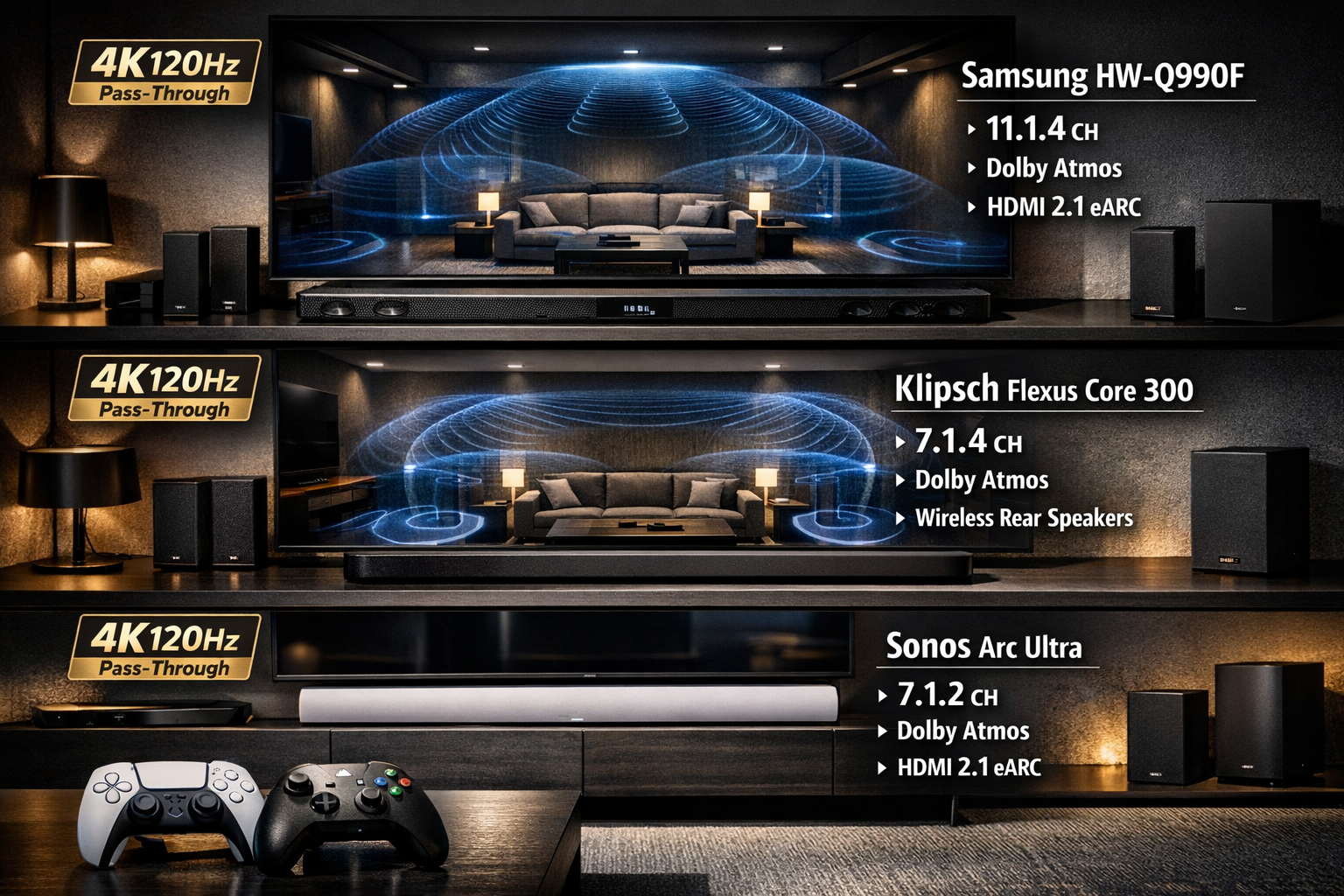
The Samsung HW-Q990F stands as a benchmark for what HDMI eARC Soundbars can achieve in 2026. This powerhouse delivers an impressive 11.1.4 channel configuration with dedicated height speakers for Dolby Atmos and DTS:X[2].
Beyond its eARC HDMI port, it includes two additional HDMI 2.1 inputs for device passthrough, allowing direct connection of gaming consoles and streaming devices.
What sets the HW-Q990F apart is its SpaceFit Sound Pro technology, which uses onboard microphones to analyze your room’s acoustics and automatically optimize audio output[2].
This intelligent calibration ensures balanced sound whether you’re in a compact apartment or spacious living room. The soundbar also supports Amazon Alexa through built-in microphones and Google Cast for wireless streaming.
The Sonos Arc Ultra takes a different approach, focusing on simplicity and premium build quality[2]. This eARC-only soundbar lacks traditional HDMI passthrough ports, requiring all devices to connect directly to your TV.
While this limits flexibility, it streamlines setup and reduces cable clutter. The Arc Ultra excels with Dolby Atmos soundbar performance, using upward-firing drivers to create convincing height effects.
For audiophiles seeking reference-grade performance, the Klipsch Flexus Core 300 offers expandability and precision[1]. Its base 5.1.2 configuration expands to 7.1.4 channels with optional wireless rear speakers.
The standout feature is Dirac Live automatic room correction, a professional-grade calibration system that measures your room’s acoustic properties and applies precise equalization. This soundbar also supports HDMI 2.1 with 4K 120Hz passthrough, making it ideal for serious gamers.
Mid-Range Options with eARC Support
Not everyone needs flagship features or pricing. The Hisense AX5125H provides excellent value with eARC support and one HDMI input for device passthrough[1].
While it lacks the channel count of premium models, it delivers solid Dolby Atmos performance for significantly less investment.
Budget-conscious buyers should explore our guide to the best budget soundbar with subwoofer options, many of which now include eARC connectivity as standard. These models prove you don’t need to spend thousands to enjoy lossless audio quality.
What to Look for in 2026 eARC Soundbars
When evaluating HDMI eARC soundbars for your setup, prioritize these features:
- HDMI 2.1 passthrough for 4K 120Hz gaming support
- Multiple HDMI inputs if you connect several devices
- Dolby Atmos and DTS:X support for immersive audio
- Room calibration technology for optimized sound
- Wireless rear speaker compatibility for true surround sound
- Voice assistant integration for smart home control
Remember that eARC requires compatible devices on both ends. Your TV must have an eARC-enabled HDMI port (typically labeled “eARC” or “ARC/eARC”) for the connection to work properly.
If you’re experiencing connection problems, our guide on fixing Sony soundbar eARC HDMI connection issues covers common troubleshooting steps applicable to most brands.
Pairing HDMI eARC Soundbars with Gaming Consoles: PS6 and Xbox Upgrades
Gaming Audio Requirements in 2026
Next-generation gaming consoles demand audio systems that can keep pace with their graphical capabilities.
While specific PlayStation 6 specifications remain unannounced, industry trends point toward enhanced spatial audio processing, higher frame rates, and increased emphasis on immersive soundscapes.
Current PlayStation 5 and Xbox Series X consoles already support Dolby Atmos for gaming, and this will only expand with future hardware.
Low latency becomes critical for competitive gaming. Audio delay—even 50 milliseconds—can mean the difference between victory and defeat in fast-paced shooters or fighting games.
eARC connections minimize this delay through improved handshake protocols and higher bandwidth, though gamers should still verify their soundbar’s gaming mode settings.
The upcoming HDMI 2.2 standard introduces the Latency Indication Protocol (LIP), which will further optimize audio timing in multi-hop configurations like consoles connected through soundbars to TVs[3].
However, as of February 2026, no consumer TVs feature HDMI 2.2 ports, making current HDMI 2.1 eARC connections the best available option.
Optimal Connection Configurations
For the best gaming experience with HDMI eARC Soundbars, follow this connection hierarchy:
Configuration 1: Direct Console to Soundbar (Preferred)
- Connect gaming console to soundbar’s HDMI input
- Connect soundbar’s eARC output to TV’s eARC input
- Enable HDMI passthrough on soundbar
- Activate gaming mode on both TV and soundbar
This setup ensures minimal audio processing delay and allows the soundbar to receive the full audio signal directly from your console. The video signal passes through to your TV without degradation, assuming your soundbar supports HDMI 2.1 bandwidth.
Configuration 2: Console to TV with eARC Return
- Connect gaming console to TV’s HDMI 2.1 port
- Connect soundbar to TV’s eARC port
- Enable eARC in TV audio settings
- Select “passthrough” or “bitstream” audio output
This configuration works when your soundbar lacks HDMI inputs or when you need multiple console connections.
The TV sends audio back to the soundbar via eARC. While this adds a processing step, modern TVs minimize latency in game mode.
Recommended eARC Soundbars for Gaming
The Klipsch Flexus Core 300 emerges as the top choice for serious gamers thanks to its HDMI 2.1 passthrough supporting 4K 120Hz signals[1].
This means you can connect your PlayStation or Xbox directly to the soundbar without sacrificing high frame rate gaming.
The Dirac Live calibration also optimizes audio for competitive gaming, enhancing directional cues.
For those seeking the best wireless soundbars for gaming, the Samsung HW-Q990F offers exceptional value with its dual HDMI 2.1 inputs[2].
You can connect both PlayStation and Xbox simultaneously, switching between them without cable swapping.
The 11.1.4 channel configuration creates a competitive advantage in games with spatial audio, allowing you to hear enemies approaching from any direction.
Budget-conscious gamers should consider soundbars with at least 5.1.2 channel configurations and eARC support. While they may lack premium features, they still deliver significantly better gaming audio than TV speakers.
Check our recommendations for the best soundbar for Samsung TV if you’re pairing with Samsung displays, as brand-specific optimizations can enhance performance.
Gaming-Specific Audio Settings
Once connected, optimize these settings for gaming:
- Enable Gaming Mode: Reduces audio processing latency
- Disable Virtual Surround: Use native Dolby Atmos instead
- Adjust Dialogue Enhancement: Turn off for gaming (optimized for movies)
- Calibrate Night Mode: Maintains audio clarity at lower volumes
- Configure Voice Chat Routing: Ensure headset audio doesn’t conflict
Many modern soundbars feature dedicated gaming presets that automatically adjust these parameters. The Samsung HW-Q990F, for example, includes a “Game Pro” mode that emphasizes directional audio cues while reducing unnecessary bass that can muddy important sounds[2].
If you experience audio delay issues, first check your TV’s audio delay compensation settings. Most 2026 TVs include adjustable audio sync controls that can offset timing differences between video and sound.
8K TV Compatibility and Future-Proofing Your Audio Setup
Current State of 8K Audio Standards
While 8K televisions continue gaining market share in 2026, the audio standards supporting them remain largely unchanged from 4K implementations.
8K content doesn’t inherently require different audio formats—Dolby Atmos and DTS:X work identically whether paired with 4K or 8K video. The bandwidth demands come from the video signal, not the audio component.
What matters for 8K TV owners is ensuring their eARC soundbar supports HDMI 2.1 bandwidth for video passthrough. The HDMI 2.1 specification provides 48 Gbps bandwidth, sufficient for 8K 60Hz or 4K 120Hz signals[1].
When shopping for soundbars to pair with 8K displays, verify the HDMI inputs support full HDMI 2.1 specifications, not just select features.
HDMI 2.2 and What’s Coming
The HDMI 2.2 specification, announced but not yet implemented in consumer products, brings improvements primarily focused on latency management rather than bandwidth increases[3].
The Latency Indication Protocol (LIP) will benefit soundbar users by providing more accurate timing information across the signal chain, reducing the audio sync issues that occasionally plague complex setups.
However, as noted in recent industry analysis, “it’s way too early to buy into HDMI 2.2 for your TV” as no manufacturers have released compatible displays as of February 2026[3].
Current HDMI 2.1 eARC connections will remain the standard for at least the next 12-18 months.
Building a Future-Proof Audio System
To ensure your investment remains relevant as technology evolves, prioritize these features:
✅ Essential Future-Proof Features:
- HDMI 2.1 eARC support (minimum requirement)
- Firmware update capability via WiFi
- Dolby Atmos and DTS:X compatibility
- Expandable speaker configurations
- Multiple HDMI 2.1 inputs (2+ preferred)
💡 Nice-to-Have Features:
- Room calibration technology
- Voice assistant integration
- Wireless rear speaker support
- Multi-room audio capability
- HDMI 2.2 readiness (when available)
The Sonos ecosystem demonstrates excellent future-proofing through regular software updates that add features post-purchase. The Arc Ultra, while launched in previous years, continues receiving enhancements that improve performance and add compatibility with new formats[2].
Connecting Your eARC Soundbar Properly
Proper cable selection matters more than many realize. Not all HDMI cables support eARC functionality. Look for cables certified as “Ultra High Speed HDMI” or explicitly labeled with eARC support.
These cables ensure the full 48 Gbps bandwidth necessary for both high-resolution video passthrough and lossless audio return.
For detailed connection guidance, our step-by-step guide to connecting soundbars via HDMI covers the complete process. Common mistakes include connecting to the wrong HDMI port (not all TV HDMI ports support eARC) or failing to enable eARC in TV settings.
If you encounter problems where your soundbar won’t connect to your TV, verify these critical points:
- TV’s eARC port is identified (usually HDMI 1 or labeled “ARC/eARC”)
- eARC is enabled in TV audio settings menu
- Soundbar is set to HDMI input mode
- CEC (Consumer Electronics Control) is enabled on both devices
- Firmware is updated on both TV and soundbar
Room Calibration and Optimization for eARC Soundbars
Why Room Acoustics Matter
Even the most expensive eARC soundbar can sound mediocre in a poorly optimized room. Sound waves reflect off walls, ceilings, and furniture, creating acoustic interference that muddles clarity and reduces spatial accuracy.
Room calibration technologies analyze these acoustic properties and apply corrective equalization to compensate.
The Klipsch Flexus Core 300’s Dirac Live system represents the gold standard for consumer room correction[1]. During setup, you place a measurement microphone at your primary listening position.
The soundbar plays test tones, measuring how sound behaves in your specific space. The system then creates a custom equalization profile that neutralizes room-induced coloration.
Samsung’s SpaceFit Sound Pro takes a simpler approach using the soundbar’s built-in microphones[2].
While less precise than dedicated measurement microphones, this automated system requires no additional equipment and still delivers noticeable improvements over uncalibrated audio.
Placement Guidelines for Maximum Impact
Proper soundbar positioning dramatically affects performance:
Ideal Soundbar Placement:
- Directly below or above TV for aligned dialogue
- Centered in the room horizontally
- Unobstructed by furniture or TV frame
- At ear level when seated (or angled upward if lower)
- Away from corners to prevent bass buildup
For soundbars with wireless subwoofers, placement becomes more flexible. Our comprehensive guide on optimal subwoofer placement explains how corner placement can enhance bass output while front-wall placement provides tighter, more accurate low frequencies.
Height speaker considerations for Dolby Atmos require careful attention. Upward-firing drivers work best with flat, reflective ceilings 8-12 feet high. Vaulted or textured ceilings can scatter sound, reducing the effectiveness of height channels.
In these situations, soundbars with physical rear speakers (like the Samsung HW-Q990F’s included surrounds) deliver more consistent results[2].
Calibrating for Different Content Types
Modern eARC soundbars offer multiple sound modes optimized for specific content:
- 🎬 Movie Mode: Enhanced bass and surround effects for cinematic impact
- 🎵 Music Mode: Balanced frequency response with reduced processing
- 🎮 Game Mode: Low latency with enhanced directional cues
- 📰 News/Dialogue Mode: Boosted vocal frequencies for clarity
- 🌙 Night Mode: Compressed dynamic range for late-night viewing
For Samsung soundbar owners, our guide on choosing the best sound mode provides detailed recommendations for each scenario. The key is matching the mode to your content—what works for action movies creates fatigue during music listening.
Addressing Common Audio Issues
Dialogue clarity problems rank among the most common soundbar complaints. If voices sound muffled or get lost in background music, try these solutions:
- Enable the soundbar’s dialogue enhancement feature
- Increase center channel level (if adjustable)
- Reduce bass levels that can mask vocals
- Move soundbar closer to ear level
- Check for audio sync issues that create perceived muddiness
Echo or reverb issues indicate room acoustic problems. Our troubleshooting guide for soundbar echoing covers advanced solutions including acoustic treatment and speaker positioning adjustments.
For those experiencing persistent connection or performance issues, consulting brand-specific guides often helps. Samsung users benefit from our detailed article on connecting Samsung soundbars to TVs, which addresses common compatibility quirks.
Choosing the Right HDMI eARC Soundbar for Your Needs
Assessing Your Space and Budget
Before purchasing, evaluate your room dimensions and layout. Small to medium rooms (up to 250 sq ft) work well with 5.1.2 or 7.1.2 channel soundbars. Larger spaces benefit from 9.1.4 or 11.1.4 configurations that fill the volume with immersive audio.
Budget allocation should follow this general framework:
- $300-$600: Entry-level eARC soundbars with basic Dolby Atmos
- $600-$1,200: Mid-tier models with room calibration and wireless subs
- $1,200-$2,000: Premium soundbars with expandable configurations
- $2,000+: Flagship systems with advanced features and superior components
Remember that higher channel counts don’t automatically mean better sound. A well-designed 5.1.2 system often outperforms a poorly implemented 9.1.4 configuration. Focus on overall build quality, driver size, and amplifier power rather than just channel numbers.
Brand Reliability and Support
Major soundbar manufacturers have established reputations worth considering:
Samsung leads in feature integration and smart home compatibility, with excellent app control and regular firmware updates. Their soundbars pair seamlessly with Samsung TVs through proprietary features like Q-Symphony, which uses TV speakers alongside the soundbar for enhanced sound[2].
Sonos prioritizes simplicity and multi-room audio, making them ideal for users invested in whole-home sound systems. The Arc Ultra’s eARC-only design reflects their philosophy of streamlined connectivity[2].
Klipsch brings audiophile-grade performance with their Flexus line, appealing to users who prioritize sound quality over smart features[1]. Their room correction technology and expandability make them excellent long-term investments.
For comprehensive brand comparisons, explore our guide to choosing the right soundbar, which breaks down the strengths and weaknesses of major manufacturers.
Questions to Ask Before Buying
🔍 Critical Purchase Considerations:
- How many HDMI devices will you connect? If more than one, ensure adequate passthrough inputs
- Is your TV eARC compatible? Check your TV’s specifications before investing in an eARC soundbar
- What’s your primary use case? Gaming, movies, and music each benefit from different features
- Can you add rear speakers later? Expandability extends the system’s useful life
- Does it support your preferred streaming services? Some soundbars include built-in streaming apps
- What’s the warranty and return policy? Audio preferences are subjective—ensure you can return if unsatisfied
Where to Buy and What to Avoid
Purchase from retailers offering generous return policies, as soundbar performance varies dramatically based on room acoustics. According to recent consumer feedback, Costco’s soundbar offerings provide excellent value with their extended return windows[4].
Red flags to avoid:
- ❌ Soundbars without explicit eARC labeling (may only support standard ARC)
- ❌ Models lacking firmware update capability
- ❌ Proprietary connection standards that limit device compatibility
- ❌ Suspiciously low prices on flagship models (verify authorized retailers)
- ❌ Soundbars without independent reviews from trusted sources
Conclusion: Making the Most of Your eARC Soundbar Investment

HDMI eARC Soundbars: Unlocking Next-Gen Audio for 8K TVs and Gaming Consoles represents more than a technical specification—it’s the foundation of immersive home entertainment in 2026.
The bandwidth increase from standard ARC to eARC enables the lossless audio formats that modern content creators intend audiences to experience.
For gamers preparing for next-generation consoles, HDMI eARC Soundbars with HDMI 2.1 passthrough deliver competitive advantages through reduced latency and enhanced spatial audio.
The ability to hear directional cues with pinpoint accuracy transforms gameplay from casual entertainment to immersive experiences.
8K TV owners benefit from future-proofed connectivity that handles today’s content while remaining compatible with tomorrow’s standards. While HDMI 2.2 promises additional improvements, current HDMI 2.1 eARC implementations provide everything necessary for premium audio quality.
Your Next Steps
Immediate Actions:
- Verify your TV’s eARC compatibility by checking the HDMI port labels and user manual
- Measure your room dimensions to determine appropriate soundbar size and channel configuration
- List your connected devices (gaming consoles, streaming boxes, etc.) to determine required HDMI inputs
- Set your budget range based on the feature tiers outlined in this guide
- Research specific models mentioned here, reading professional reviews and user feedback
Long-Term Optimization:
- Update firmware regularly to maintain compatibility and add features
- Recalibrate after room changes such as new furniture or layout modifications
- Experiment with sound modes to find optimal settings for different content types
- Consider acoustic treatment if persistent audio issues remain after calibration
- Plan for expansion by choosing systems with wireless rear speaker compatibility
The investment in a quality eARC soundbar pays dividends through years of enhanced entertainment.
Whether experiencing the cinematic soundscapes of blockbuster films, the competitive edge in multiplayer gaming, or the nuanced details in your favorite music, the right soundbar transforms how you experience audio content.
As streaming services continue expanding their Dolby Atmos libraries and game developers push spatial audio boundaries, your eARC soundbar ensures you’re ready to experience these advances as creators intended.
The technology exists today to bring professional-grade audio into your home—the only question is which system best fits your unique needs and space.
For additional guidance on specific connection scenarios or troubleshooting, explore our comprehensive library of soundbar guides.
From wireless setup instructions to advanced calibration techniques, we provide the resources needed to maximize your audio investment.
References
[1] Top Soundbars In 2026 Best Models For Every Budget – https://www.architeg-prints.com/blog/top-soundbars-in-2026-best-models-for-every-budget
[2] Best Soundbar – https://www.stuff.tv/features/best-soundbar/
[3] Its Way Too Early To Buy Into Hdmi 22 For Your Tv – https://www.pocket-lint.com/its-way-too-early-to-buy-into-hdmi-22-for-your-tv/
[4] Costco Soundbar Worth It According Users
[6] Devices Should Always Connect Tvs Earc Port – https://www.xda-developers.com/devices-should-always-connect-tvs-earc-port/