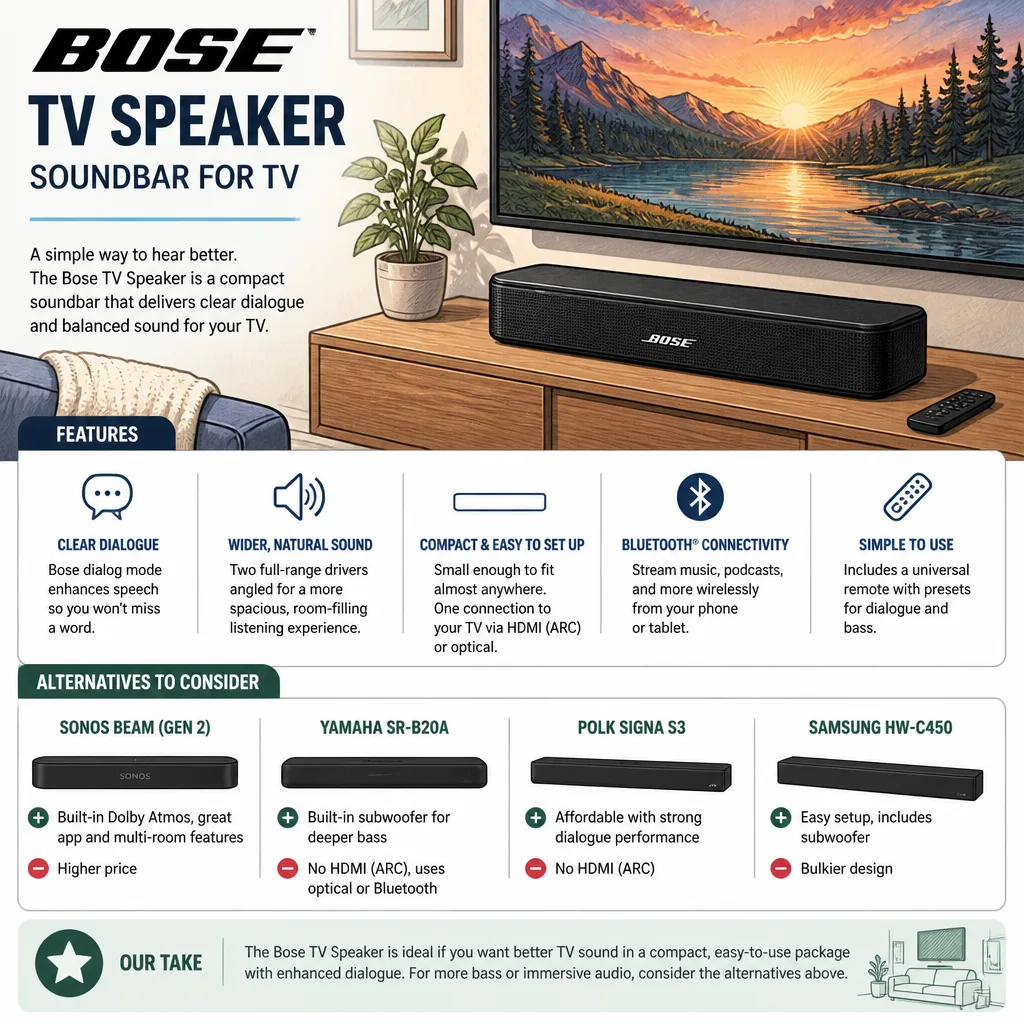
Bose TV Speaker Soundbar For TV
Latest Update: November 06, 2026
The Bose TV Speaker Soundbar For TV is a compact option for viewers who want clearer dialogue and a simple connection to their television. We explain what its connections and everyday features offer, then compare them with other Bose soundbar choices and practical setup considerations.
Key Takeaways
| What to consider | What it means for your setup |
|---|---|
| Clearer dialogue | Dialogue enhancement aims to make speech easier to follow against other television audio. |
| TV connection | Choose HDMI ARC or optical audio based on the ports available on both devices. Our Bose soundbar connection guide walks through the main options. |
| Bluetooth | Use Bluetooth for wireless music from a compatible device. A wired TV connection is the direct choice for television sound. |
| Room expectations | A compact stereo bar can improve everyday TV audio, while surround effects and strong bass depend on the sound system and its components. |
| Accessories | Treat cables, remote controls, and bass modules as package details, not automatic inclusions. |
| Comparison | Compare each Bose model by its listed inputs and sound controls, rather than by similar names alone. |
What the Bose TV Speaker is designed to improve
The Bose TV Speaker is a compact single bar soundbar with dialogue enhancement, HDMI ARC and optical digital inputs, and Bluetooth music streaming. Its dialogue feature is intended to make spoken words clearer, which can help when voices are difficult to follow over music or effects.
The Bose TV Speaker soundbar for TV is shown in these images. The linked Bose TV Speaker product listing is included for readers comparing the product.

A single bar keeps the setup compact and avoids the need to arrange separate speakers around the room. Its stereo sound can improve everyday TV listening, but a compact bar should not be mistaken for a system that creates Dolby Atmos or convincing surround effects.
We recommend judging this soundbar by the listening change you want, especially clearer speech and a straightforward setup. Do not expect a small stereo bar to deliver strong room filling bass simply because it is a soundbar.
These views show the bar itself and how it can sit with a television. The
Choose a TV connection that supports your setup
You can connect a Bose speaker to a TV when the television and soundbar share a compatible audio connection. Start by checking the ports on both devices, then select the matching TV audio output in the television settings.
Use HDMI ARC when both devices have compatible ARC ports. It sends TV audio to the soundbar, and the television settings determine whether connected device controls let the TV remote adjust volume or power.
Optical audio is a direct wired choice when both devices have optical connections. It carries television sound without relying on Bluetooth, so it is useful when HDMI ARC is unavailable or not part of your planned setup.
Before connecting anything, look at the TV ports and its sound and device control settings. If the soundbar does not turn on with the television, check the cable connection and the TV settings for audio output and connected device control.
Our guide to connecting a soundbar to a TV covers the basic process. These images show a typical television and soundbar arrangement, along with a remote used during wireless pairing.
If you want to use HDMI for the connection, our HDMI soundbar setup guide explains the connection path. The main point is to match the TV output to the soundbar input and select that output in the TV menu.
Use Bluetooth for music, not as the default TV connection
Bluetooth lets the Bose TV Speaker receive music wirelessly from a compatible phone, tablet, or other device. For television audio, HDMI ARC or optical audio gives you a direct connection between the TV and soundbar.
The Bose Solo 5 TV sound system is a 2.0 channel stereo soundbar with Bluetooth, dialogue mode, and adjustable bass control.
Its optical, coaxial, and 3.5 mm AUX inputs also provide different wired connection options, so choose the input that matches the source device’s output.
The Solo 5’s dialogue mode and bass control offer specific listening adjustments, while its multiple input types can suit a setup with more than one audio source.
Our guide to wirelessly connecting a Bose soundbar to a TV explains where Bluetooth fits into a home audio setup.
This image pairing shows the Solo 5 and a soundbar remote interface. Use the source device’s available output to decide whether Bluetooth or a cable is the practical option.
Compare Bose soundbar options by the features that matter
The Bose TV Speaker and Bose Solo 5 are easier to compare by their stated connections and controls than by their similar product names.
The TV Speaker has HDMI ARC and optical digital inputs with Bluetooth music streaming, while the Solo 5 lists optical, coaxial, and 3.5 mm AUX connections alongside Bluetooth, dialogue mode, and adjustable bass control.
The Bose Solo 5 TV soundbar is listed at $169. Weigh that price against the specific inputs and listening adjustments you will use, rather than treating a lower or higher price as a substitute for checking features.
When comparing a Bose Solo soundbar II with the Bose TV Speaker, focus on the exact model name and the concrete controls and inputs offered by each version.
Similar names do not establish that two soundbars use the same setup, dialogue features, or remote functions.
There is no universal best sounding soundbar for every television room. Choose according to the change you want to hear, such as clearer dialogue, music playback, adjustable bass, or a wider soundstage.
Consider room placement, bass, and surround expectations
Place the soundbar near the television and keep its sound output clear. Furniture, decorations, or other objects directly in front can obstruct dialogue and other audio, so listen from your usual seat after positioning it.
A compact stereo bar can improve TV audio without creating separate sound sources around the room or overhead effects associated with surround sound or Dolby Atmos.
For a larger soundstage, compare the system’s stated surround options and speaker layout with the kind of listening experience you want.
A separate bass module can add deeper low frequencies, but it is an additional component rather than an automatic part of every soundbar package. Pair a module only when the soundbar and module support a compatible connection.
The Bose soundbar connection guide describes HDMI ARC, optical cable, and Bluetooth connections, along with Dialogue Mode and Surround Sound options.
Those controls are useful comparison points when speech adjustment or a broader soundstage matters to your listening habits.
Our guide to choosing a soundbar speaker and our explanation of how TV soundbars work offer more context for comparing placement and sound modes.
These images illustrate a soundbar in a living space and a listener adjusting one during everyday use.
Check accessories and troubleshoot before settling in
Treat HDMI and optical cables, remote controls, and bass modules as separate package details.
When there is no TV audio, confirm the television’s selected sound output and the connection between the TV and soundbar. If the sound seems muffled, move objects away from the front of the bar and listen again from your usual seat.
If Bluetooth music plays but television sound does not, select the TV connection as the sound output rather than using Bluetooth as the television audio link.
When the soundbar fails to power on with the TV, revisit the TV audio output and connected device control settings.
For a reset and additional troubleshooting steps, use our Bose soundbar reset guide. A reset is best treated as a later troubleshooting step, after checking the connection and selected audio output.

Frequently Asked Questions
Can I use a Bose TV soundbar with a projector?
Yes, a Bose TV soundbar can work with a projector when the projector or connected video source provides a compatible audio output. For a projector with HDMI video connections only, route audio from the source device through a compatible output path.
Why can Bluetooth audio be out of sync with video?
Bluetooth audio processing can add a delay between the picture and sound, and different devices handle synchronization differently. A wired connection or an available audio delay adjustment can help align what you hear with what you see.
Can a soundbar and the television speakers play at the same time?
Some televisions offer a simultaneous audio setting, while others switch their internal speakers off when an external soundbar is selected. Look in the TV audio menu for an option such as TV speaker plus external audio.
Will a soundbar work with a television that has no HDMI ARC port?
Yes, a TV and soundbar can use optical audio when both have optical connections. If you use that route, select the optical output in the television menu and choose an audio format the soundbar accepts.
Can the Bose TV Speaker remember more than one Bluetooth device?
Bluetooth pairing behavior varies by model, so check the speaker’s instructions if it will not connect to another device.
Can I wall mount the Bose TV Speaker?
Mounting compatibility depends on the soundbar and the mount, so confirm that they are designed to work together. Choose a position that keeps the sound output clear and leaves the TV screen and remote sensor unobstructed.
What are the key differences between the Bose Solo soundbar II and the Bose TV Speaker?
Compare the exact model’s listed inputs and controls, since similar names do not guarantee the same features.
Conclusion
With dialogue enhancement, HDMI ARC, optical audio, and Bluetooth music streaming, the Bose TV Speaker Soundbar For TV suits shoppers who want a compact setup.
Match its connection to your television, keep expectations realistic for bass and surround effects, and compare Bose alternatives by their actual inputs and controls.

Pingback: Best Soundbars for Clear Dialogue: How to Choose in 2027 - Best Sound Bar to Buy