JBL Bar 5.1 Channel Soundbar System With Dolby Atmos
Lastest updated: November 20, 2026
Quick Answer: The search term “JBL Bar 5.1 Channel Soundbar System With Dolby Atmos” often leads to confusion because the classic JBL Bar 5.1, sold for years, does not support Dolby Atmos. The true 5.1-channel JBL soundbar with Dolby Atmos is the JBL Bar 500 (and its newer 2026 iteration, the Bar 500MK2). These models deliver a 5.1 surround experience with virtual Dolby Atmos and a powerful wireless subwoofer, making them the correct pick if you want an immersive, cinema-like sound from a single bar and sub combo.
Key Takeaways:
- The original JBL Bar 5.1 lacks Atmos; the JBL Bar 500 and Bar 500MK2 are the actual 5.1-channel Atmos systems.
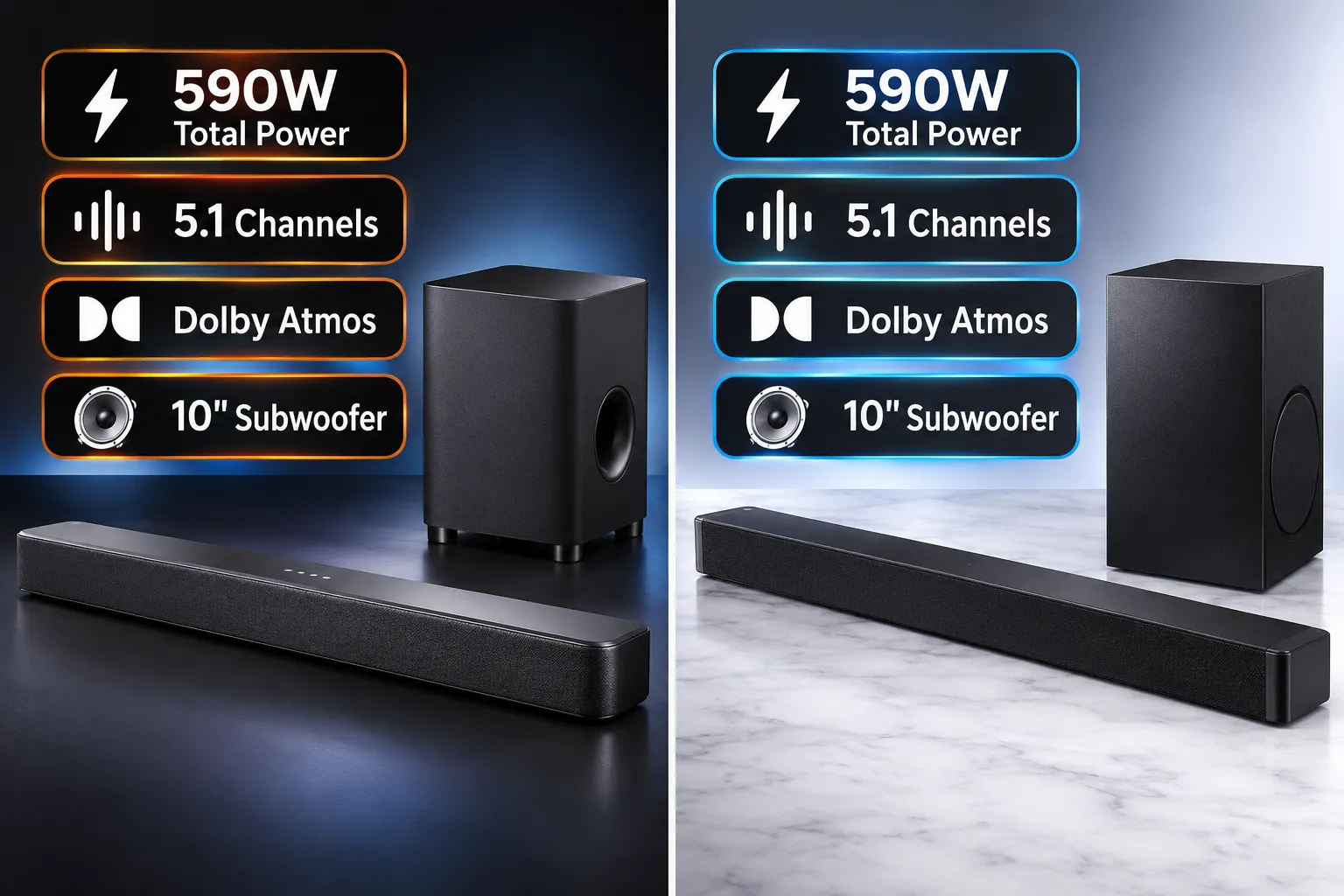
- The Bar 500 delivers 590W total power and a 10-inch wireless subwoofer; the Bar 500MK2 bumps output to 750W and adds DTS Virtual:X.
- Atmos height effects are virtualized via JBL MultiBeam technology, not up-firing drivers.
- Setup is simple with HDMI eARC, and the system works with any TV that supports ARC/eARC.
- The Bar 500/500MK2 is a strong value for movies, gaming, and music in medium to large rooms.
What Is Dolby Atmos and Why Should I Care?
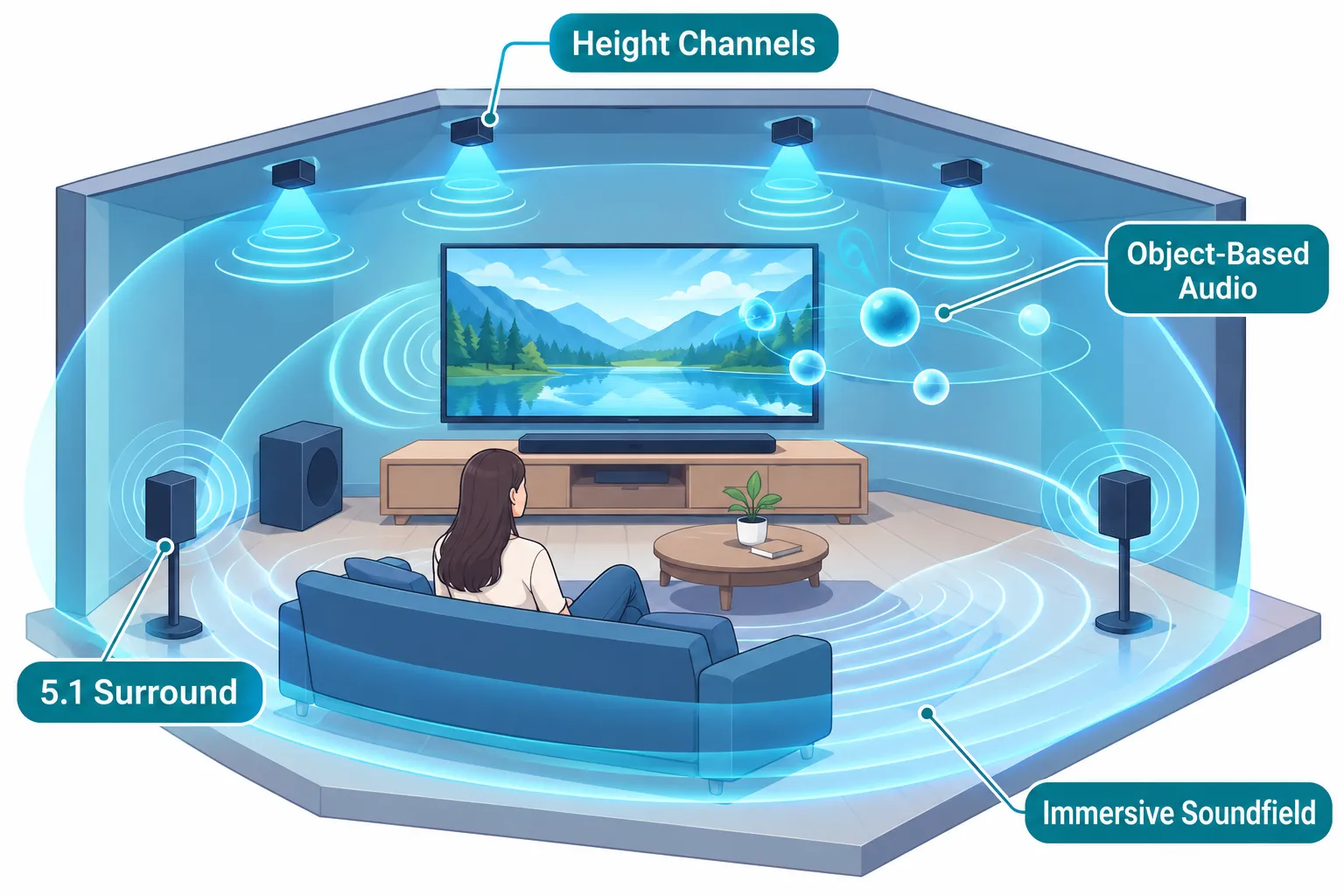
Dolby Atmos is an object-based 3D audio format that adds height channels to traditional surround sound, letting sounds move independently above and around you instead of being locked to specific speaker channels.
For a soundbar, this means rain can sound like it’s falling from above, or a helicopter can arc over your head, creating a more realistic, immersive experience.
If you watch action movies, play modern video games, or stream Atmos content from Netflix, Apple TV+, or Disney+, the difference is immediately noticeable, dialogue stays clear while effects fill the room.
The JBL Bar 500 and Bar 500MK2 use Dolby Atmos combined with JBL’s MultiBeam technology to create a virtual 5.1 soundfield without extra surround speakers, as detailed in the official JBL Bar 500 tech backgrounder.
This means you get a convincing height and surround effect from a single bar and subwoofer, though it’s not identical to a system with dedicated upward-firing drivers.
What Does 5.1 Channel Sound Mean?
A 5.1 channel sound system uses five full-range speakers (left, center, right, left surround, right surround) and one subwoofer (the “.1”) dedicated to low-frequency effects.
In a soundbar like the JBL Bar 500, these channels are created through a combination of physical drivers and digital processing, projecting sound to bounce off walls and simulate rear speakers.
The result is a true surround experience, dialogue from the center, ambient effects from the sides and rear, and deep bass from the subwoofer, without running wires across your living room.
The Bar 500’s spec sheet confirms it is a 5.1-channel system with a 10-inch wireless subwoofer, delivering 590W of total output (JBL Bar 500 specsheet).
The newer Bar 500MK2 retains the 5.1 configuration but pushes power to 750W and adds DTS Virtual:X for even broader format support (JBL Bar 500MK2 specsheet).
How Much Does the JBL Bar 5.1 Cost?
Pricing depends on which model you actually mean. The older, non-Atmos JBL Bar 5.1 can still be found at some retailers, often priced lower, but it lacks modern features.
The JBL Bar 500, the real 5.1 Atmos soundbar, launched at $599.95. The 2026 Bar 500MK2 is positioned similarly, though exact retail pricing varies by region.
When you perform a Google verifying request for the latest prices, you’ll be able to continue after a few seconds; don’t refresh the page, just continue. For a comprehensive list of current deals, check our soundbars with Dolby Atmos page.
This mid-range price puts it against competitors like the Sonos Arc and Samsung Q-series, but with the advantage of including a large wireless subwoofer in the box.
JBL Bar 5.1 vs Sonos Arc: Which Is Better?
The JBL Bar 500 (the 5.1 Atmos model) and the Sonos Arc serve different priorities. The Sonos Arc is a premium all-in-one bar that relies on its eleven drivers to create a wide soundstage and virtual height effects, but it lacks a dedicated subwoofer unless you add the separate Sonos Sub, which significantly raises the total cost.
The JBL Bar 500 comes with a 10-inch wireless subwoofer, delivering deeper, room-filling bass right out of the box.
In a bar surround review on rtings.com, the JBL Bar 500’s surround performance was praised for its clear dialogue and impactful low end, while the Sonos Arc excelled in mid-range clarity and ecosystem integration.
Choose the JBL if you want powerful bass without extra purchases; pick the Sonos Arc if you’re already invested in the Sonos ecosystem and plan to add a Sub later.
JBL Bar 5.1 vs Samsung Soundbar Comparison
Samsung’s Q-series soundbars, like the HW-Q990H, are often compared to JBL’s 5.1 Atmos offerings. The Samsung HW-Q990H is an 11.1.4-channel flagship with dedicated rear speakers and up-firing drivers, delivering a more expansive Atmos bubble.
The JBL Bar 500MK2, meanwhile, is a 5.1-channel system that virtualizes surround and height through MultiBeam 3.0, without rear speakers.
The Samsung setup is more immersive and better for large, dedicated home theaters, but it costs more and requires more space. The JBL Bar 500MK2 is simpler to set up, more compact, and still provides a convincing 5.1 experience.
For those browsing rtings.com soundbars budget subwoofer Samsung all-in-one Dolby Atmos options, the JBL Bar 500MK2 is a compelling choice if you want a single-bar solution with a subwoofer that doesn’t skimp on bass.
If you need a full surround system with rear channels, the Samsung HW-Q990H is worth the extra investment. You can also explore our best soundbar for Dolby Atmos guide for more side-by-side comparisons.
How Do I Set Up the JBL Bar 5.1 with My TV?
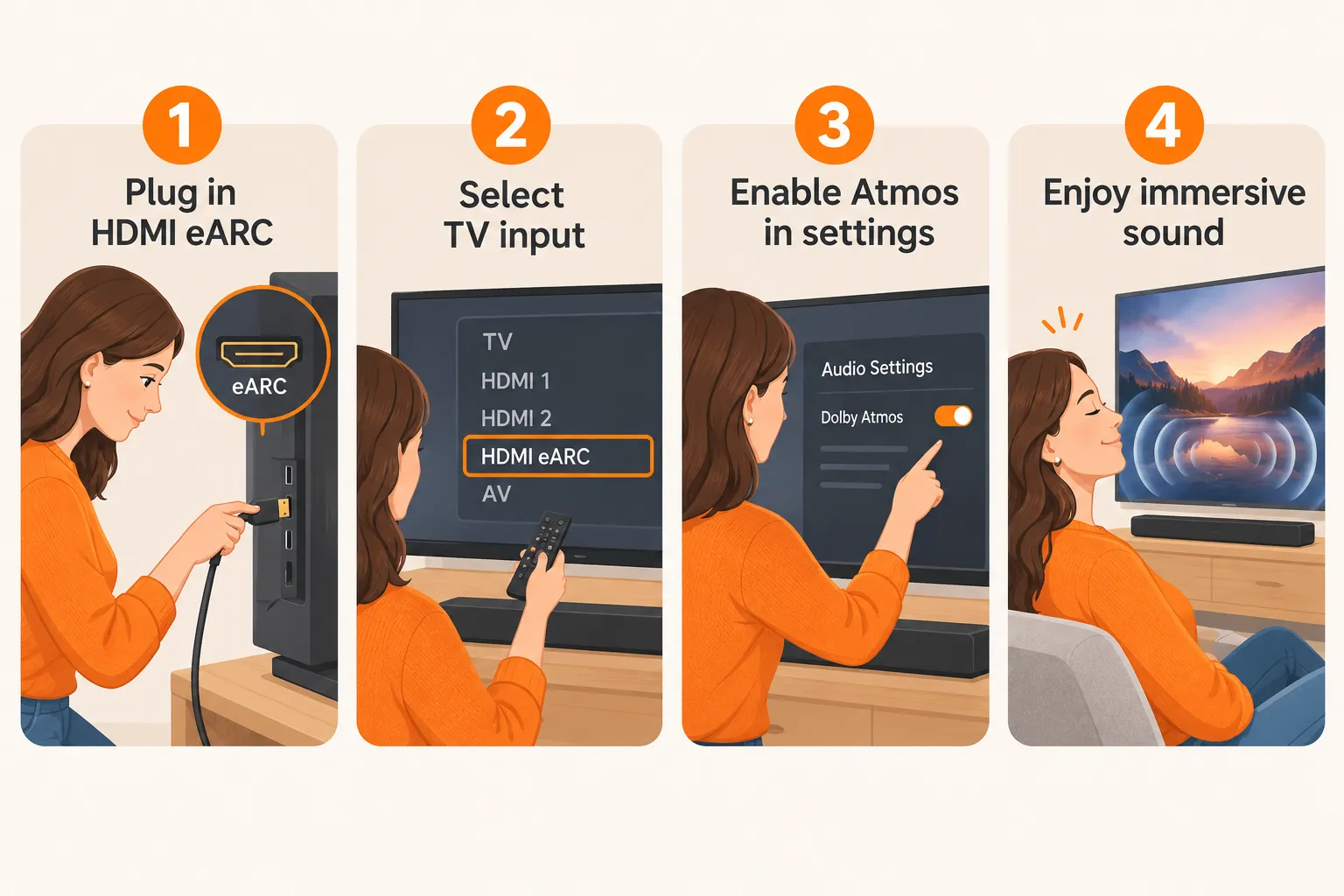
Setup is straightforward. Connect the soundbar to your TV’s HDMI eARC/ARC port using the included HDMI cable.
If your TV doesn’t have HDMI ARC, you can use the optical input, but you’ll lose Dolby Atmos, Atmos requires HDMI eARC or a direct connection from a source device to the soundbar’s HDMI input.
The wireless subwoofer pairs automatically when you power on the bar. Then, go into your TV’s audio settings, select HDMI ARC/eARC as the output, and enable passthrough or bitstream for Dolby Atmos.
For detailed step-by-step instructions, see our guide to connecting a soundbar to TV via HDMI. The JBL One app lets you fine-tune the sound and adjust the Atmos effect level.
Is the JBL Bar 5.1 Good for Gaming?
Yes, the JBL Bar 500 and 500MK2 are excellent for gaming. They support 4K Dolby Vision passthrough, so you can connect a PS5, Xbox Series X, or gaming PC directly to the soundbar’s HDMI input and still get full 4K HDR video on your TV.
Dolby Atmos and DTS Virtual:X (on the 500MK2) create a wide, precise soundstage that helps with spatial awareness in shooters and open-world games.
The low latency over eARC ensures audio stays synced with on-screen action. The powerful subwoofer adds weight to explosions and engine roars, making single-player experiences more cinematic.
For competitive gaming, a dedicated headset might still be preferred, but for living-room gaming, this system is a strong performer.
Does JBL Bar 5.1 Work with All TVs?
The JBL Bar 500 works with any TV that has an HDMI ARC or eARC port, which covers virtually all modern TVs from the last decade.
For older TVs without ARC, you can use the optical input, but you’ll be limited to Dolby Digital and won’t get Dolby Atmos.
The soundbar also supports Bluetooth for streaming music from a phone or tablet, so even a non-smart TV can benefit from improved audio. If you run into connection issues, our troubleshooting guide for soundbar TV connection problems can help.
JBL Bar 5.1 Not Connecting to Bluetooth: How to Fix
If the soundbar won’t pair via Bluetooth, first ensure it’s in pairing mode by pressing the Bluetooth button on the remote or the bar until the LED flashes blue.
Then, on your phone, forget any previous “JBL Bar 500” entry and re-pair. If that fails, power cycle both the soundbar and your device.
A factory reset, holding the power and source buttons for 10 seconds, can also clear stubborn pairing glitches.
For persistent issues, check that no other device is already connected, as the bar only maintains one Bluetooth connection at a time.
What Soundbars Are Similar to JBL Bar 5.1?
If you’re looking for a 5.1-channel soundbar with Dolby Atmos and a wireless subwoofer, the closest alternatives include the Sony Bravia Theater Bar 8, the Samsung HW-Q800D, and the Sonos Beam (Gen 2) paired with a Sub Mini.
The Sony Bravia Theater Bar 8 offers excellent dialogue clarity and integrates seamlessly with Sony Bravia TVs, while the Samsung HW-Q800D provides a similar 5.1.2 channel count with up-firing drivers for more authentic height effects.
The JBL Bar 500MK2 stands out for its raw power and included 10-inch subwoofer, making it ideal for bass lovers. For a deeper dive into how these stack up, visit our Dolby Atmos soundbar showdown.
Do I Need a Separate Subwoofer with JBL Bar 5.1?
No. The JBL Bar 500 and Bar 500MK2 both include a wireless 10-inch subwoofer in the box. This subwoofer handles all low-frequency effects, freeing the soundbar to focus on mid and high frequencies.
The result is a fuller, more dynamic sound without needing to buy an extra component. If you want even more bass, you can adjust the subwoofer level via the remote or app, but for most rooms, the included sub is more than sufficient.
For tips on placing it, check our best subwoofer placement guide.
Can You Wall Mount the JBL Bar 5.1?
Yes, the JBL Bar 500 and 500MK2 come with a wall-mount bracket and a template for easy installation. The soundbar is designed to be mounted directly below a wall-mounted TV.
Just ensure the bar has enough clearance for the upward-firing sound to reflect off the ceiling, though since these models use virtualized height rather than physical up-firing drivers, placement is more forgiving. Wall mounting also helps keep the soundbar at ear level for the best dialogue clarity.
Is JBL Bar 5.1 Worth the Money?
For anyone wanting a true 5.1-channel Dolby Atmos experience without the clutter of rear speakers, the JBL Bar 500 and 500MK2 offer excellent value.
The included 10-inch subwoofer alone would cost a few hundred dollars if purchased separately, and the MultiBeam processing creates a surprisingly wide soundstage.
The original JBL Bar 5.1, lacking Atmos, is not worth it in 2026 unless you find it at a steep discount and only need basic surround sound.
The Bar 500MK2, with its 750W output and DTS Virtual:X, is the smarter long-term investment. You can also browse our best budget soundbar with subwoofer list for more affordable alternatives.
What Room Size Is JBL Bar 5.1 Best For?
The JBL Bar 500 and 500MK2 are best suited for medium to large living rooms, roughly 150 to 400 square feet.
The 10-inch subwoofer can pressurize a decent-sized space, and the MultiBeam processing widens the sweet spot beyond a single couch. In very small rooms, the bass might feel overwhelming, but you can dial it down.
In open-plan spaces, the virtual surround effect may be less precise, but the overall volume and clarity remain strong.
Frequently Asked Questions
How do I know if my soundbar is using Dolby Atmos?
Check the soundbar’s front display or the JBL One app. When an Atmos signal is detected, the display will briefly show “Dolby Atmos” or the app will indicate the incoming audio format. You can also press the info button on the remote. Ensure your TV is set to passthrough or bitstream, and the content you’re playing is actually in Atmos.
What are the key differences between the JBL Bar 500 and Bar 500MK2 soundbars?
The Bar 500MK2 is the 2026 update with increased power (750W vs 590W), added DTS Virtual:X support, and MultiBeam 3.0 processing. Both are 5.1-channel systems with a 10-inch wireless subwoofer and Dolby Atmos. The MK2 also includes refined tuning and a slightly updated design, but the core experience is similar.
Is JBL better than Bose soundbar?
It depends on your priorities. JBL soundbars like the Bar 500MK2 emphasize powerful bass and dynamic sound with an included subwoofer, making them great for movies and gaming. Bose soundbars, such as the Smart Soundbar 900, focus on dialogue clarity and a wider soundstage, but often require a separate subwoofer purchase for comparable low-end. Choose JBL for out-of-the-box bass impact; choose Bose for vocal precision and a more compact footprint.
What is a 5.1 channel in a soundbar?
A 5.1 channel soundbar uses five discrete audio channels (left, center, right, left surround, right surround) plus a subwoofer channel. In a soundbar, the surround channels are often created through digital processing and reflected sound rather than physical rear speakers, simulating a full home theater setup from a single bar and subwoofer.
Conclusion
The JBL Bar 5.1 Channel Soundbar System With Dolby Atmos is, in reality, the JBL Bar 500 or the newer Bar 500MK2, not the older, non-Atmos Bar 5.1.
These soundbars deliver a convincing 5.1 surround experience with virtual Dolby Atmos, a powerful 10-inch wireless subwoofer, and simple setup.
They strike a sweet spot between price, performance, and convenience, making them a top choice for movie lovers and gamers who want immersive audio without a room full of speakers.
If you’re ready to upgrade, explore our soundbar with wireless subwoofer collection for the latest deals and comparisons.

Pingback: Ultimea 7.1 ch Sound Bar With Dolby Atmos Surround Sound System For TV - Best Sound Bar to Buy
Pingback: Samsung Q-Series & S-Series Soundbar Hub: Home Audio 2026 - Best Sound Bar to Buy