
Ultimea 7.1 ch Sound Bar With Dolby Atmos Surround Sound System For TV
Last updated: November 18, 2026
Quick Answer
The Ultimea 7.1 ch Sound Bar With Dolby Atmos Surround Sound System For TV is a multi speaker home theater setup built around a main soundbar, a wireless or wired subwoofer, and four (or two, depending on model) surround speakers, designed to fill a living room with Dolby Atmos sound without the cost of a full receiver based system. It connects to most modern TVs through HDMI eARC and pairs with an app for sound control. Models like the Aura A60, Aura A60 Pro, and Poseidon M100 sit in the mid range price tier and are sold through retailers including Walmart, Amazon, and Home Depot.
Key Takeaways
- Ultimea’s 7.1 ch soundbar lineup includes the Aura A60, Aura A60 Pro, Aura S5T, and the fully wireless Poseidon M100, each built around a Dolby Atmos surround sound system for TV.
- Peak power on the Aura A60 series lands around 420W, while the Poseidon M100 pushes 432W peak, placing these in the mid to upper mid tier of the soundbar market.
- Connection relies mainly on HDMI eARC for full bandwidth Dolby Atmos, plus app control and, on newer models, Bluetooth 6.0.
- A 7.1 setup adds four distinct surround channels compared to a basic soundbar, so placement and room size matter more than with a simple 2.1 bar.
- You don’t always need a separate receiver because these systems include their own amplification built into the bar and subwoofer.
- Shop around: items ship with free delivery options at many retailers, and some offer free 30-day returns if the system doesn’t fit your space.
- A 7.1 system can feel like overkill in a small apartment but shines in living rooms over 250 square feet.
What Does 7.1 Channel Surround Sound Actually Mean
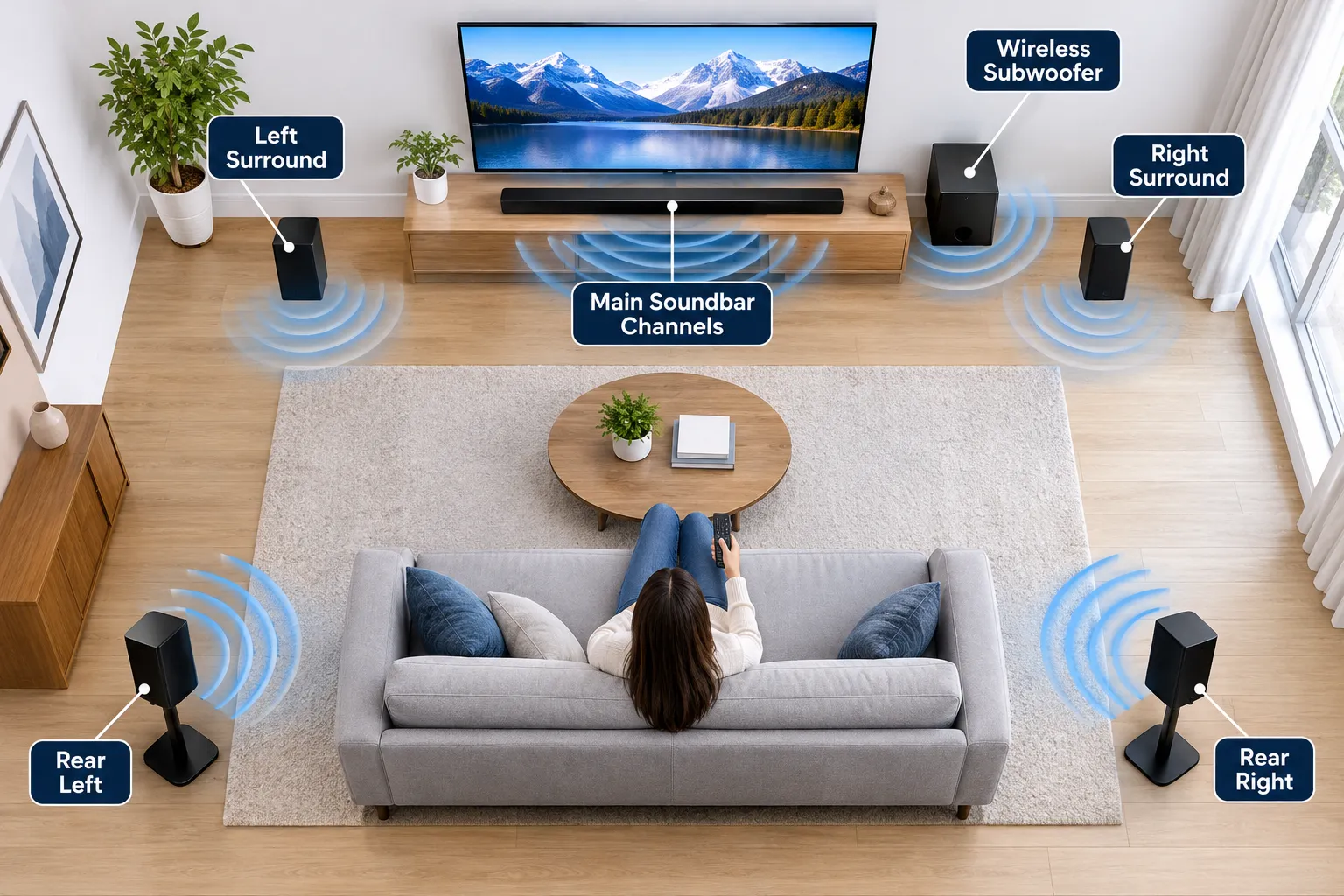
A 7.1 channel system means seven distinct speaker channels plus one subwoofer channel, giving you front left, center, front right, side left, side right, rear left, and rear right audio, with the subwoofer handling bass separately. This differs from a basic 2.1 setup, which only has left, right, and a subwoofer.
On the Aura A60 Pro, the main soundbar itself typically houses three of those channels, while four additional surround speakers, wired or wireless depending on the model, cover the remaining positions around the room.
That spread is what creates the sense of sound moving past you during a movie scene instead of just coming from the front. It’s a real step up from a standard soundbar with subwoofer, which usually sticks to two or three channels.
Is The Ultimea 7.1 Soundbar Worth The Price
Yes, for most living rooms it offers a strong value because it combines Dolby Atmos processing, a dedicated subwoofer, and four surround speakers in one package instead of requiring a separate receiver and speaker purchase.
The Aura A60 Pro system, for example, is sold as a complete 7.1ch Dolby Atmos Sound Bar with Subwoofer, using a metal enclosure rather than cheap plastic, which suggests sturdier build quality at a price well under premium home theater brands.
Whether it’s worth it for you depends on your room and expectations:
- Choose this system if you want true multi channel surround without running speaker wire across the whole room (the wireless Poseidon M100 avoids that entirely).
- Choose this system if you watch a lot of movies or play games and want the surround sound system to add real depth, not just louder front audio.
- Skip it if you live in a studio apartment under 200 square feet, where a simpler soundbar for music or 2.1 setup may do the job.
Ultimea also layers in proprietary processing like VoiceMX for dialogue clarity and BassMX for deeper low end, features the brand highlights on the Aura A60 Pro listing.
How Do I Set Up The Ultimea 7.1 Soundbar With My TV
Setup generally takes under 20 minutes if your TV supports HDMI eARC, which is the fastest path to full Dolby Atmos playback.
Plug the soundbar into the TV’s eARC labeled HDMI port, connect the subwoofer (wired models need a power outlet nearby, wireless models auto pair), position the surround speakers, then download the companion app to fine tune settings.
Basic steps:
- Confirm your TV has an HDMI eARC port and enable eARC or ARC in the TV’s audio settings.
- Connect the soundbar to that port with the included HDMI cable.
- Power on the subwoofer and let it auto pair, or plug in wired units if your model uses wired surround speakers.
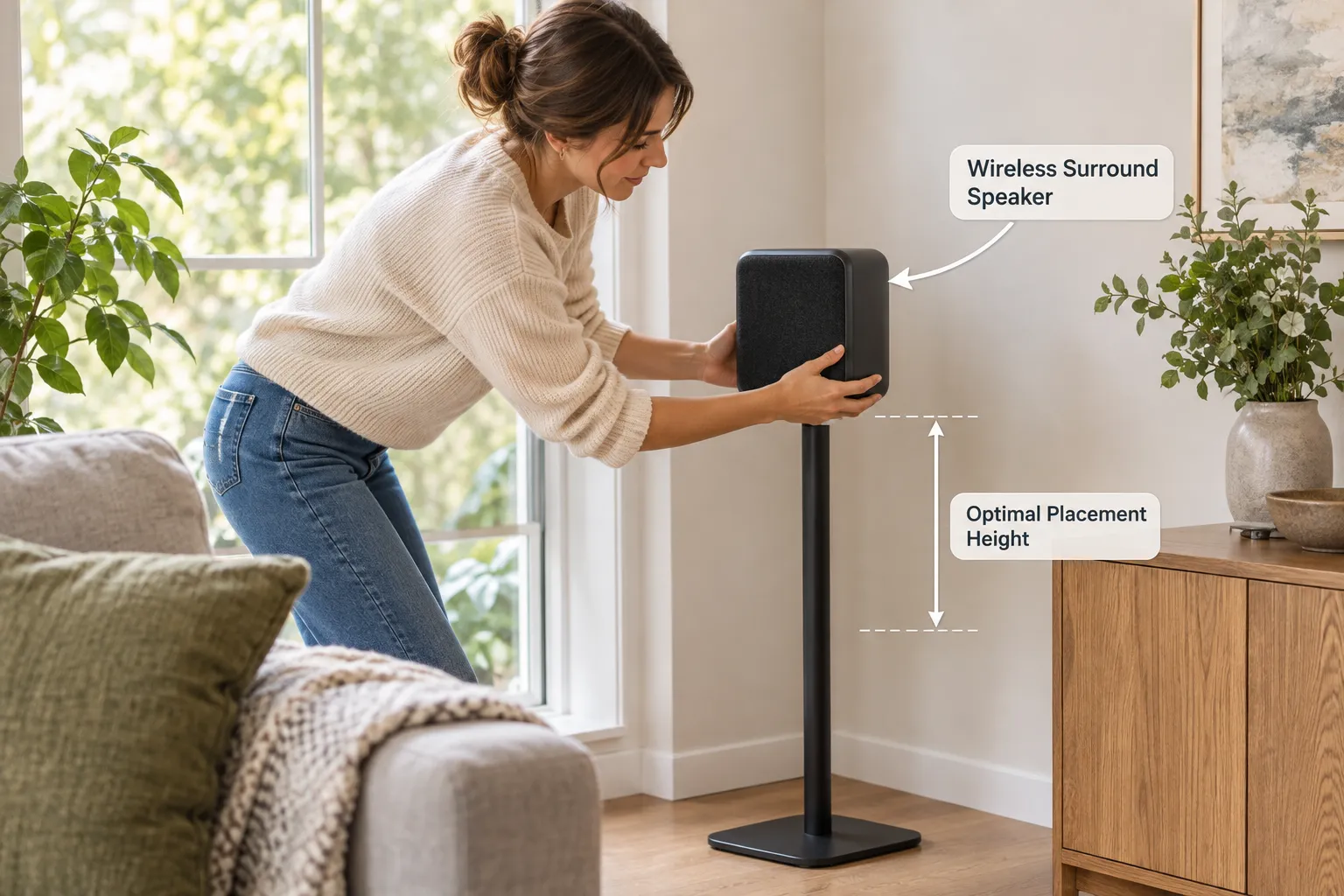
- Place the two or four surround speakers at ear height behind or beside your seating area.
- Download the Ultimea app for Dolby Atmos app control, adjust bass, treble, and surround balance.
- Run a quick test clip to confirm all seven channels are active.
If you’d rather see a general walkthrough first, our guide on connecting a soundbar to your TV covers common cable and port issues.
Ultimea 7.1 vs Samsung vs LG Soundbars Comparison
Ultimea’s 7.1 ch lineup competes directly with Samsung’s Q-Series and LG’s S-Series bars on channel count and Dolby Atmos support, but typically costs less while still including a dedicated subwoofer and four surround speakers in the box.
Samsung and LG often sell the main bar and subwoofer together but charge extra for rear surround speakers, while Ultimea usually bundles the full 7.1 system at one price.
For a closer look at Samsung specific setups, see our guide on choosing the right Samsung soundbar or how to pair a Samsung soundbar with your TV.
What TVs Does This Ultimea Soundbar Work With
Most Ultimea 7.1 ch soundbars, including the Aura A60 and Aura A60 Pro, are built to work with smart TVs that have an HDMI eARC port, which covers the vast majority of TVs sold since around 2020.
The system is marketed as compatible with smart TVs through HDMI eARC and app integration, as noted on the Aura A60 listing at Macy’s.
If your TV lacks eARC, you can still connect using a standard HDMI ARC port or an optical cable, though you may lose full Dolby Atmos bandwidth. Learn more about matching soundbars to specific TV brands in our Vizio TV connection guide.
Do I Need A Receiver For The Ultimea 7.1 Soundbar
No, you don’t need a separate AV receiver because the soundbar, subwoofer, and surround speakers all include their own built-in amplification. This is one of the main appeals of an all-in-one surround sound system for TV compared to a traditional component based home theater system wired through a receiver.
The soundbar itself acts as the control hub, processing Dolby Atmos signals and sending power to each wireless or wired surround speaker. That said, if you already own a receiver and prefer manual control over every channel, a component system might suit you better, but most buyers choosing a 7.1 soundbar want the simpler all-in-one approach.
Why Isn’t My Ultimea Soundbar Connecting To My TV
The most common cause is using a regular HDMI port instead of the one labeled eARC or ARC, or forgetting to enable eARC in the TV’s sound settings menu. Other causes include an outdated HDMI cable, a TV that needs a firmware update, or the soundbar app not having the latest firmware installed.
Quick troubleshooting checklist:
- Confirm the HDMI cable is plugged into the eARC labeled port on both the TV and soundbar.
- Go into your TV’s settings and set the sound output to “external speaker” or “soundbar.”
- Restart both devices after connecting.
- Update the soundbar firmware through the app before troubleshooting further.
For deeper troubleshooting on a similar issue with another brand, our article on a Samsung TV not connecting to a soundbar walks through nearly identical steps that apply here too.
Where Should I Place The Surround Speakers For Best Sound
Surround speakers should sit slightly behind and above ear level on either side of your main seating area, angled toward the listener, to create the most convincing wraparound effect.
For a 7.1 setup specifically, place two speakers beside your seats and two more directly behind, spaced evenly apart.
Common mistake: placing both rear speakers too close together behind the couch, which collapses the surround field into a single point instead of spreading it. For more detailed positioning advice specific to bass units, check our subwoofer placement tips.

Is 7.1 Soundbar Overkill For A Small Living Room
Yes, a full 7.1 system can feel excessive in a room under 200 square feet, where the surround speakers end up too close together to create meaningful separation.
In small spaces, a simpler 2.1 or 3.1 setup, or a slimmer bar like the Sony Bravia soundbar for tight rooms, often sounds just as immersive without cluttering the space with extra speakers and cables.
Choose 7.1 if your main seating area is at least 10 feet from the TV with open space on both sides for rear speakers. Choose a smaller system if you live in a studio apartment or small bedroom setup.
Does The Ultimea Have Wireless Or Wired Surround Speakers
It depends on the model: the Aura A60 Pro uses four wired surround speakers connected to a wired subwoofer, while the Poseidon M100 uses a fully wireless system with a 6.5 inch wireless subwoofer and two wireless surround speakers.
Both options still deliver the full Dolby Atmos surround sound system experience, but wireless models cut down on cable clutter at a slightly higher price point.
If you want zero wires running across your floor, the wireless surround speakers on the Poseidon M100 are the better pick.
If you prefer wired surround speakers for guaranteed consistent signal without worrying about dropout, the Aura A60 Pro system is the stronger option.
Can This Soundbar Work With My Older Samsung TV
It can, but only if your older Samsung TV has at least an HDMI ARC port, since full Dolby Atmos bandwidth generally needs eARC which only became common on TVs from around 2020 onward. Older Samsung models without eARC can still connect, but you may notice reduced audio quality compared to newer sets.
If your TV predates HDMI ARC entirely, an optical audio cable is usually your fallback option, though it won’t carry the full Dolby Atmos signal. Our guide on why a Samsung soundbar won’t connect to TV covers these edge cases in detail.
What Are The Best Soundbar Alternatives To Ultimea
If you want to compare options before you buy, consider soundbars from JBL, Samsung, Sony, and LG as alternatives that also support Dolby Atmos surround sound.
The JBL Bar 1300X is a strong higher end alternative, while the Sony HT-A5000 offers a simpler setup for buyers who don’t want four separate surround speakers.
For budget conscious shoppers, our roundup of the best budget soundbar with subwoofer options is worth a look before settling on a full 7.1 system.
How Much Does The Ultimea 7.1 Soundbar Cost
Pricing on Ultimea’s 7.1 ch Dolby Atmos systems generally sits in the mid range tier compared to premium brands, with the exact price varying by retailer and current promotions. You can check current pricing and available items at Walmart or compare the listing directly on Amazon before you continue to purchase.
Many retailers also run early deal reduced pricing around major shopping seasons, so it’s worth checking back before you buy.
If you shop through Walmart, you may also want to look into the Walmart Rewards Mastercard, which can help you save on qualifying items, and remember that free 30-day returns and standard terms and conditions apply at most major retailers if the system doesn’t work out for your room.
Is This Soundbar Good For Gaming And Movies Or Just Movies
The Ultimea 7.1 ch Dolby Atmos system works well for both gaming and movies, since the same surround channels that place movie sound effects around the room also help you hear footsteps and directional cues in games.
Dolby Atmos processing adds height cues too, which many gamers notice during competitive titles that use positional audio cues.
For a deeper dive into gaming specific audio setups, see our guide to the best wireless soundbars for gaming, which covers latency and input lag considerations that matter more for games than movies.
Key Item Features And Specifications
The core features across Ultimea’s 7.1 ch lineup include a Dolby Atmos processing engine, HDMI eARC connectivity, companion app control, and either wired or wireless surround speakers depending on the model. Peak power output ranges from roughly 420W on the Aura series to 432W on the Poseidon M100, which Amazon lists in full detail.
Specification highlights:
- Channels: 7.1 (seven speaker channels plus subwoofer)
- Peak power: 420W to 432W depending on model
- Subwoofer size: 4 inch to 6.5 inch depending on model
- Connectivity: HDMI eARC, app control, Bluetooth 6.0 on newer models
- Build: metal enclosure on higher tier models like the Aura A60 Pro
Ultimea’s broader Dolby Atmos catalog, listed on their official collection page, includes over 20 Atmos enabled products as of mid 2026, showing a clear strategic push into multi channel sound systems across price tiers.
Shop Confidently And Delivery Options
Shopping confidently for this surround sound system means checking the retailer’s return window, delivery timeline, and whether free shipping applies before you add the item to your cart.
Most major retailers, including Walmart, offer free delivery on qualifying orders and free 30-day returns if the Dolby Atmos experience doesn’t match your room’s acoustics.
Before you continue through checkout, review the seller’s terms and conditions, especially around pro seller listings on third party marketplaces, since return policies can differ from items sold and shipped directly by the retailer.
Frequently Asked Questions
What are the top 3 best soundbars?
Among highly regarded options are Sonos Arc Ultra for premium Dolby Atmos performance, Samsung’s Q-Series for strong all around surround sound, and Ultimea’s 7.1 ch Aura or Poseidon systems for budget friendly multi channel surround. The best pick depends on your room size, budget, and whether you want wired or wireless surround speakers.
Is there a big difference between 2.1 and 3.1 sound bars?
Yes, a 3.1 soundbar adds a dedicated center channel for clearer dialogue compared to a 2.1 setup, which splits dialogue across left and right speakers only. The difference is most noticeable during movie dialogue and news broadcasts, where a 3.1 system sounds noticeably clearer and more focused.
What does Dolby Atmos mean on a soundbar?
Dolby Atmos is an audio format that adds height based sound objects on top of standard surround channels, creating the sense that sound comes from above as well as around you. On a soundbar, this usually relies on upward firing speakers or advanced processing to simulate that overhead effect without ceiling mounted speakers.
Is 7.1 or 5.1 better?
7.1 adds two extra side surround channels compared to 5.1, giving more precise directional sound in larger rooms. For most living rooms under 300 square feet, 5.1 performs nearly as well, so 7.1 is mainly worth the extra speakers if you have a wider seating area or want the most detailed sound placement possible.
Conclusion
The Ultimea 7.1 ch Sound Bar With Dolby Atmos Surround Sound System For TV gives you a complete surround sound system, subwoofer, and app controlled Dolby Atmos processing without the cost or wiring hassle of a full receiver based setup.
It fits best in living rooms with real floor space for surround speakers, and it works smoothly with most modern smart TVs through HDMI eARC.
Before you buy, measure your room, confirm your TV has an eARC port, and decide whether you want wired or wireless surround speakers.
Then compare current pricing at Walmart or on Amazon, check the return window, and take advantage of free delivery where it’s offered.
If you want to explore other Atmos options first, our best soundbar for Dolby Atmos roundup is a solid next stop before you commit.